

Introduction
Servify is the most seamless device lifecycle management platform that integrates multiple partners such as repair centres, logistic partners, payment gateway, distributors and retailers to deliver a great customer experience. The platform helps the consumers to get both in-warranty and out-of-warranty service, activation of protection plans and claim process, buy-back of old devices and guidance on the next purchase.
API Reference
All the APIs are RESTful APIs that are delivered over HTTPS. We provide with sandbox (development) environments to test your integration.
There are authorization and authentication mechanisms in place to provide security for sensitive information and transactions. All clients need to fetch a session token before accessing any API. Clients can only access the APIs for which they have been granted permission. These APIs are available over a set of IP addresses provided by the client.
All request and response payloads are encrypted using RSA encryption and a set of public keys are exchanged between the client and Servify. For authentication purpose and validity of a request, there is also an HMAC authentication in place.
In case you have questions, please talk to your contact at Servify to have this set up.
Responses
Success case
The response format for success case for our APIs is as per the following standard
Sample success case response:
{
    "status": 200,
    "success": true,
    "message": "Fetched Warranty Details",
    "data": {
        ...
    }
}
Response parameters description:
status - number
HTTP status code of request
success - boolean
Value can be true/false. This will represent the success or failure of the API execution
message - string
A meaningful, end-user-readable message
data - object/array
Contains the response payload
Failure case
The response format for failure case for our APIs is as per the following standard
Sample failure case response:
{
    "status": 401,
    "success": false,
    "message": "Invalid credentials",
    "data": {},
    "errorCode": "CLIENT.INVALID.401",
    "ticketNumber": "ba1da2e1-7ae4-4a76-8ba9-11951de5e13c"
}
Response parameters description:
status - number
HTTP status code of request
success - boolean
Value can be true/false. This will represent the success or failure of the API execution
message - string
A meaningful, end-user-readable message, explaining what went wrong
data - object/array
Contains the response payload
errorCode - string
Unique human-readable error code
ticketNumber - string
Request reference number
Errors
HTTP status code
Servify uses conventional HTTP response codes to indicate the success or failure of an API request.
Codes in the 2xx range indicate success.
Codes in the 4xx range indicate an error that failed given the information provided.
Codes in the 5xx range indicate an error with Servify's servers.
| HTTP STATUS CODE | DESCRIPTION |
|---|---|
| 200 - OK | Everything worked as expected |
| 400 - Bad Request | The request is unacceptable, often due to missing a required parameter |
| 401 - Unauthorized | Unauthorized request details |
| 5XX - Internal Server Error | Something went wrong on Servify’s end |
Error codes
The error codes defined are as follows -
| ERROR CODE | DESCRIPTION |
|---|---|
| CLIENT.INVALID.401 | Invalid client-id sent in headers |
| HMAC.INVALID.401 | Invalid hmac-signature sent in headers |
| DATA.BAD_REQUEST.400 | Request is not proper |
| PUBLIC_KEY.INVALID.401 | Client public key is invalid |
| DECRYPTION.ERROR.401 | Unable to decrypt the request body |
| IP.INVALID.401 | The source is not authorized with Servify |
| API.INVALID.401 | Client is not authorized for this API |
| TOK.EXP.001 | Authentication token is either invalid or expired |
| API.LIMIT.429 | API hit limit exceeded |
| SM.WTR.500 | Something went wrong in Servify |
| SM.WTR.001 | Something went wrong |
Async APIs
Consider using the asynchronous APIs when there's a need to send a large number of requests to Servify and no requirement for immediate responses. In this method, all incoming requests will be placed into a queue, and you will promptly receive confirmation that they have been successfully received.
The async APIs works as below (visual representation alongside):
- Call the Servify async API with a unique id request-code in the request headers along with the other data points
- Servify pushes the data in a queue with basic validations applied
- Servify returns back an acknowledgement of the data being queued
{ "status": 200, "success": true, "message": "Data successfully sent to the queue", "data": { "requestCode": "b6e9075c-ac6e-40ef-8c71-382077d5ecfe" } } - Servify internally processes the data and sends the API response back to the client via client's callback API along with requestCode which was sent in #1
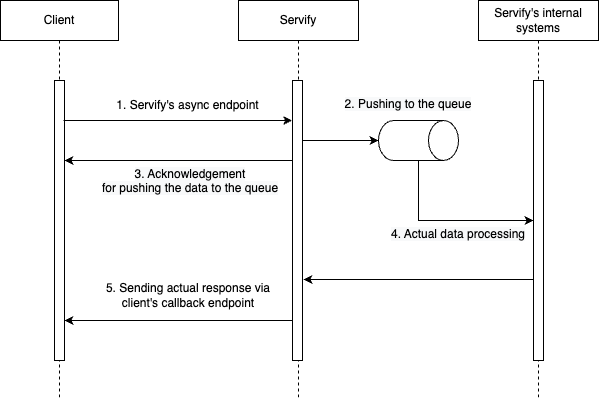
Recommended sample request:
{
    "externalReferenceID": "SM123123",
    "soldPlanCode": "ABC007",
    "requestCode": "b6e9075c-ac6e-40ef-8c71-382077d5ecfe"
}
Recommended sample response:
{
    "success": true,
    "message": "Successfully sent registration callback"
}
Callback API
A callback URL serves as a crucial integration point, enabling our system to inform you once the data has been processed internally.
If a processed response is needed back, please provide a detailed documentation with the following points considered:
1) Authentication mechanism for accessing the callback API
2) Required request parameters, specifying data types and fields
3) Required response parameters, specifying data types and fields
4) Criteria for determining success within the response
5) List of different HTTP statuses with associated descriptions
6) List of different error codes and their corresponding meanings
7) Under what circumstances should we attempt to resend the request, and what should be the timeframe for initiating a retry
8) URL for test environment and production
Currently, we offer three policy/contract APIs configured with async mechanism:
/Async/Contract/createContract: This API is used for creating new contract for consumer; It creates a contract for the provided customer and device
/Async/Contract/renewContract: This API is used for creating renewed contract of the new plan against older contract and device
/Async/Contract/createTransaction: This API is used for creating a transaction of monthly payments against a policy/contract
Authentication
Auth/generateToken
Servify APIs use client-session-id to authenticate requests. It is a authentication token used to access the authorized resources. You must include a valid client-session-id with every request.
The client-session-id is generated by using Auth/generateToken API.
Index:
1) Information that Servify will provide you
2) Information you will have to provide Servify
3) How to generate a client-session-id
4) Explanation for all the request parameters (Headers and body)
5) Explanation for all the response parameters
6) Encryption of request parameters
Details Servify will provide
The following details will be shared with you separately. Each entity will have a different value in every environment.
client_id - string
This will be the unique id for the client and must be passed in request headers of all APIs.
Please refer to the section Request headers for more details.
client-signature - string
This is a secret key which will be of 64 characters.
Please use this to generate the HMAC.
Please refer to the section How to generate HMAC for more details.
Public Key - pem
This is Servify's public key which will be used to encrypt request body for all the APIs.
Please refer to the section Encryption for more details.
Base url - url
This will be the consistent part of the url.
All the API routes will follow after this path.
Details you must provide
The following details need to be provided by the client for an integration with Servify.
Public Key - pem
This is Client's public key which will be used to encrypt response body for all the APIs.
Please refer to the section Encryption for more details.
List of IP address:
Please provide with a list of IP addresses which are to be whitelisted.
Only requests from these IP addresses will be accepted.
Example curl:
curl --location --request POST
'https://clientstag.servify.tech/Auth/generateToken' \
--header 'x-host: client_host.com' \
--header 'x-date: Wed, 27 May 2020 12:02:02 GMT' \
--header 'client-id: CLIENT_ID' \
--header 'hmac-signature: NogQF/mUlMDqz2fo40NadNsX0JDhD7+ISwH/w/2Rfeo=' \
--header 'Content-Type: application/json' \
--data-raw '<encrypted version of {}>'
Response: You will receive the encrypted version of the following:
{
    status: 200,
    success: true,
    message: 'Success',
    data:{
        token: 'f041f550-a10e-11ea-9031-7f40dc138825',
        ttl: 1590690721
    }
}
How to generate the client-session-id (Authentication token)
To generate the client-session-id, please call the following API:
${{base_url}}/Auth/generateToken
The base_url will be different for each environment.
IMPORTANT:
1) Please note that the validity of this token is only for 15 mins
2) After 15 mins the client will have to re-authenticate and generate a new token
3) Once authenticated and the token is received at client’s end, the client will then have to provide that token as client-session-id in request headers for all other following API calls to verify the client at Servify’s end.
Request headers
content-type - string, value is "application/json"
This is used to indicate the media type of the resource
x-host - string
Host from which the API is being called.
Eg: client_url.com
x-date - string
Current date in the format (ddd, DD MMM YYYY HH:mm:ss)
Eg: "Fri, 10 Jun 2016 18:14:49 GMT"
client-id - string
This will be an identification for the client.
This will be provided by Servify.
hmac-signature - string
This is used by Servify to validate the authenticity of a message.
To generate an HMAC please use the following function:
base64(hmac-sha256(Signaturestring))
Please look at the section on How to generate HMAC for more details
The example below are written in NodeJS.
const message = 'x-date: '+ headers['x-date'] + '\n' + 'x-host: ' + headers['x-host'];
How to generate HMAC
Create a variable message.
Set it's value to
‘x-date: date used in request headers’ + ‘\n’ + ‘x-host: host used in request header’
Eg in NodeJS:
const secret = '9uHh4sVY5va4vafgp3ACewwmebQTY8XXFaSuQTUHUcZGANHq8TGW5vKw2jns7yYT';
const hmac = crypto.createHmac("sha256", secret).update(message).digest("base64");
HMAC is calculated as: base64(hmac-sha256(message, secret))
The first pass of the algorithm produces an internal hash derived from the message and the secret key.
Take the above generated hash and encode it using base64
IMPORTANT: Servify will provide the client with a secret key which will be of 64 characters. Client is to use the provided secret key to generate the hmac.
Response explained
success - boolean
True if token is successfully generated, false in case of any kind of failure
status - integer
401 in case of authentication failure, otherwise 200
message - string
Success or failure message
data - object
The data object will have the token and the time to live for the said token
Child attributes of data object:
data.token - string
This will be a unique authentication token generated by Servify. This is the said client-session-id
Eg: 89a26740-0f46-11e9-bb22-2374bb535bc8
data.ttl - integer
This is the timestamp at which the above token will expire.
Eg: 1574094964
Example API Request Body:
{
  "$data": "RZzOwN8dDBUYyWFPbloDGaGqipFoRPEOMzjx8tKysxZRCdTHl8vnhLkaAgegl34TGoev1PH03/E9cio73aMLKqi45UsG3SP/aTAtTnHiC6dKHyDJ2gJqH/enT7DIv3EH3VJVpP/drzWHUTTWfak1QMQv64YRbhbmm/LUsMUns6Z6RGEGYLFhGXRxxAB8wjWVgvwtkT1uLDZkAWLRTWTZCiym9iYFB2xDKuWb+fkUudWTyYzJQ=="
}
Example API Response Body:
{
  "$data": "RZzOwN8dDBUYyWFPbloDGaGqipFoRPEOMzjx8tKysxZRCdTHl8vnhLkaAgegl34TGoev1PH03/E9cio73aMLKqi45UsG3SP/fXl+VX/8BqL4F9qA6bz90yvxWMZMiWJENqMJak86znoWEgQqRby4czjfDvMgGj7VIonnkwnbiZ10/RQAJrkXi87j3/aTAtTnHiC6dKHyDJ2gJqH/enT7DIv3EH3VJVpP/drzWHUTTWfak1QMQv64YRbhbmm/LUsMUns6Z6RGEGYLFhGXRxxAB8wjWVgvwtkT1uLDZkAWLRTWTZCiym9iYFB2xDKuWb+fkUudWTyYzJQ=="
}
Encryption
- Servify uses RSA encryption algorithm to encrypt data for API request and response.
- Encryption is done only for request and response body, not the headers.
- PKCS1_OAEP is used as default encryption scheme.
- All the APIs request and response will be only in one single format as shown below.
Where:
$data - this parameter will contain the base64 string of encrypted API request or response buffer.
How to start with encryption?
To achieve the above written encryption and decryption, client needs to create a RSA key pair which can be generated with the commands (linux) shown on the right.
Follow these commands to generate RSA key pair:
$ openssl genrsa -out ./privkey.pem 2048
$ openssl rsa -in ./privkey.pem -pubout -out ./pubkey.pem
Once the keys are created, client will provide their public key to Servify and in return Servify will provide it’s public key to client. Both the systems need to configure each other’s key in their system.
Once the keys are configured, whenever client calls any Servify API, the API request body must be encrypted using Servify’s public key configured in the client's system and should send the base64 string of encrypted buffer to Servify. (Check out Sample Code)
And in case of response, Servify will encrypt the response body using client’s public key and will send back the base64 string of the encrypted buffer to Client as shown in the examples.
Client will have to decrypt the string given in $data using their own private key. After decryption the client will get their expected response.
Example API Response Body (In case of no encryption for above cases):
{
    "status": 401,
    "success": false,
    "message": "Invalid credentials",
    "data": {},
    "errorCode": "CLIENT.INVALID.401",
    "ticketNumber": "ba1da2e1-7ae4-4a76-8ba9-11951de5e13c"
}
IMPORTANT
Even for cases where data is an empty object (which will for Auth/generateToken), client needs to send it in an encrypted format.
Contract
createContract
This API is used for creating new contract for consumer. It creates a contract for the provided customer and device.
Sample cURL:
curl --location --request POST 'https://clientstag.servify.tech/Contract/createContract' \
--header 'Content-Type: application/json' \
--header 'client-id: <CLIENT_ID>' \
--header 'hmac-signature: <HMAC_SIGNATURE>' \
--header 'x-date: <DATE>' \
--header 'x-host: <CLIENT_HOST.COM>' \
--header 'client-session-id: <CLIENT_SESSION_ID>'   \
--data-raw '{ "$data":"<ENCRYPTED_DATA>" }'
Decrypted Request Body:
{
    "ExternalReferenceID": "IND20D1775222344",
    "ProductUniqueID": "3569054353457",
    "SerialNumber": "hdgse356hs73h92b",
    "AlternateUniqueKey": "hfjshsh2345677w2233",
    "DeviceDateOfPurchase": "2020-06-15",
    "CustomerName": "Test",
    "PhoneCode": "91",
    "CountryCode": "IN",
    "CurrencyCode": "INR",
    "MobileNo": "9098000000",
    "EmailID": "abc@gmail.com",
    "AlternateMobileNo": "9890111111",
    "BrandCode": "Samsung",
    "ProductPurchaseCost": 55000,
    "DateOfPurchase": "2020-02-21",
    "PlanCode": "SFYPROTECT01",
    "ExternalPlanCode": "INDSTG20200131234543",
    "ProductSubCategoryCode": "Smartphone",
    "StorageCapacity": "256GB",
    "RAM": "12GB",
    "State": "Maharastra",
    "Zipcode": "400093",
    "OrderID": "M111909063431711479",
    "OrderItemID": "323244344",
    "PlanPrice": 3000,
    "StoreCode": "Store101",
    "CustomerAddress": {
        "AddressLine1": "4090 Landing Lange",
        "AddressLine2": "APT 2004",
        "Zipcode": "400056",
        "City": "Mumbai",
        "State": "Maharashtra"
    },
    "Frequency": 1,
    "FrequencyUnit": "MONTH",
    "SalesChannel": "ABCXYZ"
}
Request Parameter Description
ExternalReferenceID* - string
External reference ID of contract, it is client reference ID of contract
ProductUniqueID* - string
IMEI number of device
SerialNumber - string
Serial number of device
AlternateUniqueKey - string
Device's second IMEI number
DeviceDateOfPurchase* - string
Device date of purchase, date format is YYYY-MM-DD
CustomerName* - string
Customer name who has purchased the contract
PhoneCode* - string
Customer phone number's country code
CountryCode* - string
Country code of customer
CurrencyCode* - string
ISO 3 digit currency code configured for payment amount
MobileNo* - string
Mobile number of customer
EmailID* - string
Email address of customer
AlternateMobileNo - string
Alternate mobile number of customer
BrandCode* - string
Brand code of customer device (to be in sync with Servify Masters)
PlanCode* - string
Master plan code as per Servify system
DateOfPurchase* - string
Contract purchase date, date format is YYYY-MM-DD
ExternalPlanCode - string
External plan code, it is client's unique plan code
ProductSubCategoryCode* - string
Device product subcategory code (to be in sync with Servify Masters)
StorageCapacity - string
Storage capacity attribute of the device
RAM - string
RAM attribute of the device
State* - string
Customer's state
Zipcode* - string
Customer's zipcode
OrderID - string
Customer’s purchase order number
OrderItemID - string
Unique number of purchased item within the order
PlanPrice* - float
Plan amount (mandatory when PlanCode is passed in the request)
StoreCode - string
Store ID of the external retail system from where plan is sold (mandatory for purchase from partner’s physical store and to be updated in Servify system as part of the onboarding activity)
Frequency* - number
Payment frequency value of the plan
FrequencyUnit* - string
Payment frequency unit of the plan
SalesChannel - string
Channel of the sales
CustomerAddress - Object
Details of the customer’s address
Child attributes of CustomerAddress object:
AddressLine1 - string
Street address
AddressLine2 - string
Apr/Suite/Bldg of the location
Zipcode - string
Zipcode of the address
City - string
City of the address
State - string
State of the address
Decrypted Response Body:
{
    "status": 200,
    "success": true,
    "message": "Success",
    "data": {
        "SoldPlanCode": "M345DERT"
    }
}
Response Object Parameters
status - number
HTTP status code of the request
success - boolean
Value can be true/false. This will represent the success or failure of the API execution
message - string
A meaningful, end-user-readable message
data - object
Contains the response payload
Child attributes of data object:
SoldPlanCode - string
Plan code of Servify
cancelContract
This API is used for canceling consumer contract in Servify system.
Sample cURL:
curl --location --request POST 'https://clientstag.servify.tech/Contract/cancelContract' \
--header 'Content-Type: application/json' \
--header 'client-id: <CLIENT_ID>' \
--header 'hmac-signature: <HMAC_SIGNATURE>' \
--header 'x-date: <DATE>' \
--header 'x-host: <CLIENT_HOST.COM>' \
--header 'client-session-id: <CLIENT_SESSION_ID>' \
--data-raw '{ "$data":"<ENCRYPTED_DATA>" }'
Decrypted Request Body:
{
    "SoldPlanCode": "MUF3U5NB",
    "ExternalReferenceID": "ABCHDED",
    "ReasonCode": "RC101",
    "CancellationInitiationDate": "2022-12-02"
}
Request Parameter Description
SoldPlanCode - string
Plan code of Servify
ExternalReferenceID - string
Unique policy ID of partner system
ReasonCode* - string
Unique identifier to know the exact reason of cancellation
CancellationInitiationDate* - string
Date of plan cancel request by customer or payment failure to continue plan coverage
Decrypted Response Body:
{
    "status": 200,
    "success": true,
    "message": "Successfully cancelled order",
    "data": {
        "StatusCode": "ELIGIBLE",
        "CoverageEndDate": "2022-12-09",
        "PlanCancellationDate": "2022-10-09",
        "CancellationInitiationDate": "2022-06-09",
        "isCancellable": true
    }
}
Response Object Parameters
status - number
HTTP status code of the request
success - boolean
Value can be true/false. This will represent the success or failure of the API execution
message - string
A meaningful, end-user-readable message
data - object
Contains the response payload
Child attributes of data object:
StatusCode - string
Predefined codes for identifying the cancellation status
CoverageEndDate - string
Date from which consumer cannot avail any coverage benefits
PlanCancellationDate - string
Date on which plan will be cancelled
CancellationInitiationDate - object
Date of plan cancellation request by customer or payment failure to continue plan coverage
isCancellable - boolean
Is the plan cancellable or not
getContractInfo
This API is used to get contracts details by contract ID.
Sample cURL:
curl --location --request POST 'https://clientstag.servify.tech/Contract/getContractInfo' \
--header 'Content-Type: application/json' \
--header 'client-id: <CLIENT_ID>' \
--header 'hmac-signature: <HMAC_SIGNATURE>' \
--header 'x-date: <DATE>' \
--header 'x-host: <CLIENT_HOST.COM>' \
--header 'client-session-id: <CLIENT_SESSION_ID>' \
--data-raw '{ "$data":"<ENCRYPTED_DATA>" }'
Decrypted Request Body:
{
    "ExternalReferenceID": "IND20D1775222222",
    "SoldPlanCode" : "AB1BBCCC"
}
Request Parameter Description
ExternalReferenceID - string
Unique policy ID of partner system
SoldPlanCode - string
Unique policy ID of Servify system
Decrypted Response Body:
{
    "status": 200,
    "success": true,
    "message": "fetched contract details",
    "data": {
        "Contract": {
            "ContractID": "IND20D1775222222",
            "ContractName": "Samsung Care+ Screen Protection contract",
            "ContractCode": "SCP657331G",
            "ContractType": "Protect",
            "CoverageStartDate": "2020-02-21",
            "Status": -8,
            "StatusText": "Active",
            "NoOfRepairsUsed": 0,
            "NoOfRepairsAllowed": 1,
            "SoldPlanCode": "3SS2SVDG",
            "ValidityTillDate": "2020-10-25"
        },
        "Customer": {
            "Name": "Test",
            "PhoneCode": "91",
            "CountryCode": "+91",
            "MobileNo": "87144444444",
            "AlternateMobileNo": "87144444444",
            "EmailID": "customer@gmail.com",
            "Active": "1"
        },
        "Device": {
            "RegistrationDate": "2020-04-03T00:00:00.000Z",
            "ModelNo": "",
            "WarrantyType": "",
            "DateOfPurchase": "",
            "IsActive": true,
            "ProductName": "Galaxy Note 10",
            "BrandName": "Samsung",
            "InRepair": false
        }
    }
}
Response Object Parameters
status - number
HTTP status code of the request
success - boolean
Value can be true/false. This will represent the success or failure of the API execution
message - string
A meaningful, end-user-readable message
data - object
Contains the response payload
Child attributes of data object:
Contract - object
Contract details
Child attributes of Contract object:
ContractID - string
External reference ID of contract, it is client reference ID of contract
ContractName - string
Name of the contract
ContractCode - string
Contract code of Servify
ContractType - string
Type of contract, is it protect or secure
CoverageStartDate - string
Contract coverage start date, date format is YYYY-MM-DD
Status - number
Contract status in Servify
StatusText - string
Plan status text
NoOfRepairsUsed - number
Number of repairs done in that contract
NoOfRepairsAllowed - number
Total allowed repairs in contract
SoldPlanCode - string
Unique policy ID of Servify system
ValidityTillDate - string
Contract coverage end date, date format is YYYY-MM-DD
Customer - object
Customer's details
Child attributes of Customer object:
Name - string
Name of the customer
PhoneCode - string
Customer's phone number's country code
CountryCode - string
Country code of customer
MobileNo - string
Customer's mobile number
AlternateMobileNo - string
Alternate mobile number of customer
EmailID - string
Email ID of customer
Device - object
Customer's device details
Active - string
Current status of customer
Child attributes of Device object:
RegistrationDate - string
Device's registration date in Servify system, date is IST format
ModelNo - string
Device's model number
WarrantyType - string
Device's warranty type
DateOfPurchase - string
Device's date of purchase, date format is YYYY-MM-DD
IsActive - boolean
Device's active flag in Servify
ProductName - string
Device's product name
BrandName - string
Device's brand name
InRepair - boolean
This flag will indicate whether the device is currently under repair or not
getContractList
This API is used to get contract list of contracts.
Sample cURL:
curl --location --request POST 'https://clientstag.servify.tech/Contract/getContractList' \
--header 'Content-Type: application/json' \
--header 'client-id: <CLIENT_ID>' \
--header 'hmac-signature: <HMAC_SIGNATURE>' \
--header 'x-date: <DATE>' \
--header 'x-host: <CLIENT_HOST.COM>' \
--header 'client-session-id: <CLIENT_SESSION_ID>' \
--data-raw '{ "$data":"<ENCRYPTED_DATA>" }'
Decrypted Request Body:
{
    "StartDate": "2020-03-01",
    "EndDate": "2020-06-15",
    "limitFilter": 5,
    "Pagination": {
        "CurrentPage": 1
    }
}
Request Parameter Description
StartDate* - string
Contract sold date from, date format is YYYY-MM-DD
EndDate* - string
Contract sold date to, date format is YYYY-MM-DD
limitFilter - number
Number of records requested
Pagination* - string
Pagination object
Child attributes of Pagination object:
CurrentPage - string
Page number requested for
Decrypted Response Body:
{
    "status": 200,
    "success": true,
    "message": "successfully fetched contracts",
    "data": {
        "ContractList": [{
            "StatusText": "Activated",
            "ExternalReferenceID": "IND20C0774994123",
            "ContractCode": "DQFP6S123"
        }, {
            "StatusText": "Activated",
            "ExternalReferenceID": "IND20C1814873456",
            "ContractCode": "9M36WV456"
        }, {
            "StatusText": "Activated",
            "ExternalReferenceID": "IND20C1777139789",
            "ContractCode": "ONTAYB789"
        }, {
            "StatusText": "Refunded",
            "ExternalReferenceID": "IND20C1856698012",
            "ContractCode": "65S33R012"
        }, {
            "StatusText": "Refunded",
            "ExternalReferenceID": "IND20C1899491345",
            "ContractCode": "FFAFS6345"
        }],
        "TotalCount": 916,
        "TotalPages": 184,
        "ItemsPerPage": 5
    }
}
Response Object Parameters
status - number
HTTP status code of the request
success - boolean
Value can be true/false. This will represent the success or failure of the API execution
message - string
A meaningful, end-user-readable message
data - string
Contains the response payload
Child attributes of data object:
ContractList - array of objects
Contract list array
Child attributes of ContractList object:
StatusText - string
Current status of contract in Servify
ExternalReferenceID - string
External reference ID of broker, it is client's agent ID
ContractCode - string
Contract code of Servify
TotalCount - number
Total number of contracts
TotalPages - number
Total number of page as per "limitFilter"
ItemsPerPage - number
Total number of contract items per page as per "limitFilter"
updateOrderDetails
This API is being used to update the end user details against the order
Sample cURL:
curl --location --request POST 'https://clientstag.servify.tech/Contract/updateOrderDetails' \
--header 'Content-Type: application/json' \
--header 'client-id: <CLIENT_ID>' \
--header 'hmac-signature: <HMAC_SIGNATURE>' \
--header 'x-date: <DATE>' \
--header 'x-host: <CLIENT_HOST.COM>' \
--header 'client-session-id: <CLIENT_SESSION_ID>'   \
--data-raw '{ "$data":"<ENCRYPTED_DATA>" }'
Decrypted Request Body:
{
    "OrderID": "USATESTER780512",
    "Consumer": {
        "Name": "Robert Smith",
        "EmailID": "r.j@test.xyz",
        "MobileNo": "999999999"
    },
    "Contract": {
        "State": "Kansas",
        "ZipCode": "120103"
    }
}
Request Parameter Description
OrderID* – string
Customer’s purchase order number
Consumer* - object Contains Consumer details
Child attributes of Consumer object: Consumer object should contain at least one of the params from Name, EmailID or MobileNo
Name - string Name of the consumer
MobileNo - number Mobile number of the consumer
EmailID - string Email ID of the consumer
Contract* - object Contains Contract details
Child attributes of Contract object:
ZipCode - number Zipcode of the location
State - string Name of the state
Decrypted Response Body:
{
    "status": 200,
    "success": true,
    "message": "Your request to update the order has been accepted",
    "data": {
        "EligibilityStatusCode": "UPDATE_REQUEST_ACCEPTED"
    }
}
Response Object Parameters
status - number
HTTP status code of the request
success - boolean
Value can be true/false. This will represent the success or failure of the API execution
message - string
A meaningful, end-user-readable message
data - object
Contains the response payload
Child attributes of data object:
EligibilityStatusCode - string
Predefined codes for identifying the request eligibility status
updateContract
This API is used for update the contract details (Consumer, ConsumerProduct, ZipCode and State).
Sample cURL:
curl --location --request POST 'https://clientstag.servify.tech/Contract/updateContract' \
--header 'Content-Type: application/json' \
--header 'client-id: <CLIENT_ID>' \
--header 'hmac-signature: <HMAC_SIGNATURE>' \
--header 'x-date: <DATE>' \
--header 'x-host: <CLIENT_HOST.COM>' \
--header 'client-session-id: <CLIENT_SESSION_ID>'   \
--data-raw '{ "$data":"<ENCRYPTED_DATA>" }'
Decrypted Request Body:
{
    "SoldPlanCode": "SDGHFJDF",
    "ExternalReferenceID": "AAA11AA1AAAA1111A",
    "Device": {
        "ModelNo": "AA1111",
        "ProductUniqueID": "111111111111",
        "AlternateUniqueKey": "187166666666",
        "TertiaryUniqueKey": "83817998",
        "SerialNumber": "1267854670881",
        "BrandCode": "SAMSUNG"
    },
    "Consumer": {
        "CountryCode": "IN",
        "Name": "Test",
        "MobileNo": "1111111111",
        "EmailID": "test123@xyz.com"
    },
    "Contract": {
        "AddressLine1": "APT 2004",
        "AddressLine2": "4090 Landing Lange",
        "City": "Louisville",
        "State": "Maharashtra",
        "ZipCode": "401203"
    }
}
Request Parameter Description
SoldPlanCode – string
Plan code of Servify
ExternalReferenceID* – string
External reference ID of contract, it is client reference ID of contract
Device* - object Contains device details
Child attributes of Device object:
ModelNo* - string Model number of the device
ProductUniqueID* - string Product unique id of the device
AlternateUniqueKey - string Alternate unique key of the device
TertiaryUniqueKey - string Tertiary unique key of the device
SerialNumber* - string Serial number of the device
BrandCode* - string Brand code of the brand
Consumer* - object Contains consumer details
Child attributes of Consumer object:
CountryCode* - string Code of the country
Name - string Name of the consumer
MobileNo - number Mobile number of the consumer
EmailID - string Email ID of the consumer
Contract* - object Contains contract details
Child attributes of Contract object:
AddressLine1 - number Street address
AddressLine2 - string Apr/Suite/Bldg of the location
City - string Name of the city
State - string Name of the state
ZipCode - string Zip code of the location
Decrypted Response Body:
{
    "status": 200,
    "success": true,
    "message": "Success",
    "data": {}
}
Response Object Parameters
status - number
HTTP status code of the request
success - boolean
Value can be true/false. This will represent the success or failure of the API execution
message - string
A meaningful, end-user-readable message
data - array
Contains the response payload
checkEligibility
This API is used for checking the purchase eligibility of any particular contract.
Sample cURL:
curl --location --request POST 'https://clientstag.servify.tech/Contract/checkEligibility' \
--header 'Content-Type: application/json' \
--header 'client-id: <CLIENT_ID>' \
--header 'hmac-signature: <HMAC_SIGNATURE>' \
--header 'x-date: <DATE>' \
--header 'x-host: <CLIENT_HOST.COM>' \
--header 'client-session-id: <CLIENT_SESSION_ID>' \
--data-raw '{ "$data":"<ENCRYPTED_DATA>" }'
Decrypted Request Body:
{
    "PlanCode": "QWER123",
    "BrandCode": "OnePlus",
    "ProductUniqueID": "123456789012345",
    "ProductPurchaseCost": 52000,
    "CountryCode": "IN",
    "ProductSubCategoryCode": "SMART_PHONE",
    "ProductCode": "DE1ED3B56A40",
    "DeviceDateOfPurchase": "2020-07-29",
    "RAM": "8GB",
    "StorageCapacity": "128GB",
    "LastRepairDate": "2020-07-29",
    "SerialNo": "HSJXGAHQYW"
}
Request Parameter Description
PlanCode* - string
Contract bode to identify contract
BrandCode* - string
Brand code of customer device (to be in sync with Servify masters)
ProductUniqueID* - string
Unique ID of the device (Serial No / IMEI)
ProductPurchaseCost* - number
Purchase cost of device
CountryCode* - string
Country code of the country where the purchase is being made
ProductSubCategoryCode* - string
Device product subcategory code (to be in sync with Servify masters)
ProductCode - string
Product code of device (to be in sync with Servify masters)
DeviceDateOfPurchase - string
Date of purchase of device in YYYY-MM-DD format
RAM - string
Ram details of the device
StorageCapacity - string
Storage capacity of the device
LastRepairDate - number
Last repair date of the device in YYYY-MM-DD format
SerialNo - string
Serial number of the device
Decrypted Response Body (success):
{
    "status": 200,
    "success": true,
    "message": "Success",
    "data": {
        "IsEligible": true,
        "PlanPrice": 2997,
        "EligibilityStatusCode": "ELIGIBLE_FOR_PLAN",
        "DeviceDateOfPurchase": "2020-10-01",
        "CurrencyCode": "INR",
        "PlanName": "Gadget Insurance",
        "PlanCode": "QWER123",
        "PlanImage": "https://amazonurl.com/oneplus/assets/plan+image.png",
        "PlanTermsAndConditions": "https://amazonurl.com/tnc/random_path",
        "ProductName": "iPhone 11",
        "app": "Bhartiaxa_airtel"
    }
}
Response Object Parameters
status - number
HTTP status code of the request
success - boolean
Value can be true/false. This will represent the success or failure of the API execution
message - string
A meaningful, end-user-readable message, explaining what went wrong
data - object
Contains the response payload
Child attributes of data object:
IsEligible - boolean
Is the plan eligible for the device
EligibilityStatusCode - string
Eligibility code that specifies the reasons for ineligibility
PlanPrice - number
Price of the plan
CurrencyCode - string
Currency code for the above price
PlanName - string
Name of the plan
PlanCode - string
Plan code to identify the plan
PlanImage - string
Link of the plan image to be displayed
PlanTermsAndConditions - string
Link of T&C of the plan
ProductName - string
Name of the product for the serial number that was passed in
DeviceDateOfPurchase - string
Device date of purchase
app - string
SDK app name of Servify
Eligibility Status Codes
| Error Code | Description |
|---|---|
| ALREADY_REGISTERED_AGAINST_POLICY | This device is already registered under the desired plan |
| UNSUPPORTED_DEVICE_DATE_OF_PURCHASE | Sorry, you have missed the last date to protect your device under this plan |
| UNSUPPORTED_DEVICE | This plan does not cover the desired device model |
| UNSUPPORTED_PRODUCT_PURCHASE_COST | This plan does not cover the desired device model purchased at the mentioned price |
| INVALID_REQUEST_PARAMS | Sorry, we didn't receive all the information needed for activating the contract |
| UNSUPPORTED_LAST_REPAIR_DATE | Sorry, the last repair date of this device is older than the allowed limit for contract activation |
| ELIGIBLE_FOR_PLAN | Congratulations, this device is eligible to be protected under the desired plan |
| UNSUPPORTED_COUNTRY | Sorry, this plan is not yet available in your desired country |
| INVALID_DEVICE_UNIQUE_IDENTIFIER | The device serial number/IMEI seems to be invalid |
| UNSUPPORTED_APP | Sorry, you are not authorised to do this transaction |
| UNSUPPORTED_PLAN_PRICE | Sorry, we couldn't find the plan price for your device |
getContractDetailsbyIMEI
This API is used to fetch the maximum date till which warranty is valid for given IMEIs.
Sample cURL:
curl --location --request POST 'https://clientstag.servify.tech/Contract/getContractDetailsbyIMEI' \
--header 'Content-Type: application/json' \
--header 'client-id: <CLIENT_ID>' \
--header 'hmac-signature: <HMAC_SIGNATURE>' \
--header 'x-date: <DATE>' \
--header 'x-host: <CLIENT_HOST.COM>' \
--header 'client-session-id: <CLIENT_SESSION_ID>' \
--data-raw '{ "$data":"<ENCRYPTED_DATA>" }'
Decrypted Request Body:
{
    "IMEIs": [
        "G6TX80YSKPH4",
        "DCFYUUGFEHB",
        "863368002001144",
        "466",
        "555555555555555",
        "352196073325201"
    ]
}
Request Parameter Description
IMEIs - array of string
IMEIs of various consumer devices
Decrypted Response Body:
{
    "status": 200,
    "success": true,
    "message": "Fetched Warranty Details",
    "data": [
        {
            "imei": "G6TX80YSKPH4",
            "warrantyTill": "2019-08-20"
        },
        {
            "imei": "DCFYUUGFEHB",
            "warrantyTill": "2016-12-21"
        },
        {
            "imei": "466",
            "warrantyTill": "2017-12-20"
        },
        {
            "imei": "863368002001144",
            "warrantyTill": "2016-11-28"
        },
        {
            "imei": "555555555555555",
            "warrantyTill": "2019-08-20"
        }
    ]
}
Response Object Parameters
status - number
HTTP status code of the request
success - boolean
Value can be true/false. This will represent the success or failure of the API execution
message - string
A meaningful, end-user-readable message
data - array
Contains the response payload
Child attributes of data object:
imei - string
The IMEI sent in request for which maximum warranty is found
WarrantyTill - string
The maximum warranty of given IMEI
getOrderActivationDetails
This API is used for fetching order and activation details .
Sample cURL:
curl --location --request POST 'http://172.21.3.37:5032/Contract/getOrderActivationDetails' \
--header 'Content-Type: application/json' \
--header 'client-id: ServifyTest' \
--header 'hmac-signature: /AkfSpGLCQ5zFHAejeKsG3jyJ/9CbgUNp2Gc+9g2ANU=' \
--header 'x-date: Thu, 17 Dec 2020 15:33:44 GMT' \
--header 'x-host: servify.com' \
--header 'client-session-id: b984bfa0-a727-11eb-974d-39de79ded01b' \
--data-raw '{ "$data":"<ENCRYPTED_DATA>" }'
Decrypted Request Body:
{
    "OrderID": "407-1418709-8201106",
    "OrderDate": "2020-10-16",
    "OrderItems": [
        {
            "OrderItemID": "13260358121035"
        }
    ]
}
Request Parameter Description
OrderID - string
Order ID of contract
OrderDate - string
Order date of contract
OrderItems - object
Contains order details of contract
OrderItemID - string
OrderItemID of contract
Decrypted Response Body:
{
    "status": 200,
    "success": true,
    "message": "The order details are successfully fetched",
    "data": {
        "OrderID": "407-1418709-8201106",
        "OrderItems": [
            {
                "OrderItemID": "13260358121035",
                "OrderItemData": [
                    {
                        "ActivationCode": "WYJJWS7G"
                    }
                ]
            }
        ]
    }
}
Response Object Parameters
status - number
HTTP status code of the request
success - boolean
Value can be true/false. This will represent the success or failure of the API execution
message - string
A meaningful, end-user-readable message
data - object
Contains the response payload
Child attributes of data object:
OrderID - string
OrderID of contract
OrderItems - string
Contains order and activation details of contract
Child attributes of OrderItems object:
OrderItemID - string
OrderItemID of contract
OrderItemData - string
Contains activation details of contract
Child attributes of OrderItems object:
ActivationCode - string
Activation code for activating contract.
renewContract
This API is used for creating renewed contract of the new Plan against older contract and device
Sample cURL:
curl --location --request POST 'https://clientstag.servify.tech/Contract/renewContract' \
--header 'Content-Type: application/json' \
--header 'client-id: <CLIENT_ID>' \
--header 'hmac-signature: <HMAC_SIGNATURE>' \
--header 'x-date: <DATE>' \
--header 'x-host: <CLIENT_HOST.COM>' \
--header 'client-session-id: <CLIENT_SESSION_ID>' \
--data-raw '{ "$data":"<ENCRYPTED_DATA>" }'
Decrypted Request Body:
{
    "SoldPlanCode": "MUF3U5NB",
    "AssociatedSoldPlanCode": "HDGHFJDF",
    "ExternalReferenceID": "IND123412NEW",
    "AssociatedExternalReferenceID": "IND123412OLD",
    "ExternalPlanCode": "INDPRD101",
    "PlanCode": "RC101",
    "SalesChannel": "ABC"
}
Request Parameter Description
SoldPlanCode* - string
SoldPlanCode of the newly registered contract. (This is required when renewal is initiated through Servify)
AssociatedSoldPlanCode* - string
SoldPlanCode of the old contract which is getting renewed.
ExternalReferenceID* - string
PolicyID of the renewed contract from partner’s system
AssociatedExternalReferenceID - string
PolicyID of the old contract from partner’s system
ExternalPlanCode* - string
PID of the renewed policy
PlanCode* - string
Unique code of Servify system to identify policy
SalesChannel* - string
Channel of the sales
Decrypted Response Body:
{
    "status": 200,
    "success": true,
    "message": "Success",
    "data": {
        "SoldPlanCode": "MUF3UNEW"
    }
}
Response Object Parameters
status - number
HTTP status code of the request
success - boolean
Value can be true/false. This will represent the success or failure of the API execution
message - string
A meaningful, end-user-readable message
data - object
Contains the response payload
Child attributes of data object:
SoldPlanCode - string
Servify contract ID of the renewed contract
createTransaction
This API is used for creating a transaction of monthly payments against a policy/contract
Sample cURL:
curl --location --request POST 'https://clientstag.servify.tech/Contract/createTransaction' \
--header 'Content-Type: application/json' \
--header 'client-id: <CLIENT_ID>' \
--header 'hmac-signature: <HMAC_SIGNATURE>' \
--header 'x-date: <DATE>' \
--header 'x-host: <CLIENT_HOST.COM>' \
--header 'client-session-id: <CLIENT_SESSION_ID>' \
--data-raw '{ "$data":"<ENCRYPTED_DATA>" }'
Decrypted Request Body:
{
    "SoldPlanCode": "MUF3U5NB",
    "ExternalReferenceID": "IND123412NEW",
    "TransactionType": "SUCCESS",
    "ExternalPaymentID": "PAY1335w9323",
    "PaymentDate": "2022-04-31 18:13:22",
    "Amount": 25.50,
    "CurrencyCode": "USD"
}
Request Parameter Description
SoldPlanCode - string
Unique policy ID of Servify system
ExternalReferenceID* - string
Unique policy ID of partner's system
TransactionType* - string
Type of the transaction
ExternalPaymentID* - string
Unique payment ID of each month’s payment in partner's system
PaymentDate* - string
DateTime on which the payment is made in YYYY-MM-DD HH:mm:ss format UTC timezone
Amount* - float
Paid amount or refund amount
CurrencyCode* - string
Currency code for the amount
Decrypted Response Body:
{
    "status": 200,
    "success": true,
    "message": "Success",
    "data": {}
}
Response Object Parameters
status - number
HTTP status code of the request
success - boolean
Value can be true/false. This will represent the success or failure of the API execution
message - string
A meaningful, end-user-readable message
data - object
Contains the response payload
reactivate
This API is used for reactivating a sold plan which is currently in cancelled state
Sample cURL:
curl --location --request POST 'https://clientstag.servify.tech/Contract/reactivate' \
--header 'Content-Type: application/json' \
--header 'client-id: <CLIENT_ID>' \
--header 'hmac-signature: <HMAC_SIGNATURE>' \
--header 'x-date: <DATE>' \
--header 'x-host: <CLIENT_HOST.COM>' \
--header 'client-session-id: <CLIENT_SESSION_ID>' \
--data-raw '{ "$data":"<ENCRYPTED_DATA>" }'
Decrypted Request Body:
{
    "SoldPlanCode": "MUF3U5NB",
    "ExternalReferenceID": "IND123412NEW"
}
Request Parameter Description
SoldPlanCode - string
Unique policy ID of Servify system
ExternalReferenceID* - string
Unique policy ID of partner's system
Decrypted Response Body:
{
    "status": 200,
    "success": true,
    "message": "Success",
    "data": {
        "StatusCode": "REACTIVATION_REQUEST_ACCEPTED"
    }
}
Response Object Parameters
status - number
HTTP status code of the request
success - boolean
Value can be true/false. This will represent the success or failure of the API execution
message - string
A meaningful, end-user-readable message
data - object
Contains the response payload
Child attributes of data object:
StatusCode - string
Predefined codes for identifying the status
Trade-In
cancelTradeInRequest
This API is used to cancel the trade-in request, cancel request call before the request process for trade-in.
Sample cURL:
curl --location --request POST 'https://clientstag.servify.tech/TradeIn/cancelTradeInRequest' \
--header 'Content-Type: application/json' \
--header 'client-id: <CLIENT_ID>' \
--header 'hmac-signature: <HMAC_SIGNATURE>' \
--header 'x-date: <DATE>' \
--header 'x-host: <CLIENT_HOST.COM>' \
--header 'client-session-id: <CLIENT_SESSION_ID>' \
--data-raw '{ "$data":"<ENCRYPTED_DATA>" }'
Decrypted Request Body:
{
    "partner": "servify" ,
    "userName": "tradein_test",
    "tradeInReferenceID": "V1CTSVJX13"
}
Request Parameter Description
partner - string
Partner reference code/name, this is provided by client's during the integration
tradeInReferenceID - string
Servify trade-in request reference ID
userName - string
Trade-in user name, this is provided by client's during the integration
Decrypted Response Body:
{
    "status": 200,
    "success": true,
    "message": "Success",
    "data": {}
}
Response Object Parameters
status - number
HTTP status code of the request
message - string
A meaningful, end-user-readable message
data - object
Contains the response payload
getTradeInRequestDetails
This API is used to get trade-in request details based on the reference ID which the client had provided in API "createTradeInRequest"
Sample cURL:
curl --location --request POST 'https://clientstag.servify.tech/TradeIn/getTradeInRequestDetails' \
--header 'Content-Type: application/json' \
--header 'client-id: <CLIENT_ID>' \
--header 'hmac-signature: <HMAC_SIGNATURE>' \
--header 'x-date: <DATE>' \
--header 'x-host: <CLIENT_HOST.COM>' \
--header 'client-session-id: <CLIENT_SESSION_ID>' \
--data-raw '{ "$data":"<ENCRYPTED_DATA>" }'
Decrypted Request Body:
{
    "partner": "Paytm",
    "tradeInReferenceID": "UE5DKK30BH"
}
Request Parameter Description
partner - string
Partner name which is provided by Servify during integration
tradeInReferenceID* - string
Servify trade-in request reference ID
Decrypted Response Body:
{
   "status": 200,
   "success": true,
   "message": "Success",
   "data": {
       "tradeInReferenceID": "FIFIFIFIFIG",
       "retailerAmount": 5900,
       "customerAmount": 5610,
       "currencyCode": "INR",
       "variantDetail": "vivo Y200e 5G Saffron Delight 128 GB 6 GB",
       "imei": "000000000000000",
       "logisticsReferenceID": 69000000043,
       "tradeInStatus": "Completed",
       "appleStoreID": "800000",
       "consumerName": "Saha",
       "offer": {
              "offerName": "Redmi Note 13 Pro+ 5G offer",
              "offerValue": 3000,
              "upgradeProductUniqueID": "6900000000043"
       },
       "mobileNo": "0000001111",
       "tradeInQuestionAnswer": [
           {
               "question": "Please tell us how old is the device?",
               "questionDesc": "",
               "type": "Physical",
               "reportedAnswer": [
                   {
                       "answer": "11+ months"
                   }
               ]
           },
           {
               "question": "Is the device Powering ON? ",
               "questionDesc": "",
               "type": "Physical",
               "reportedAnswer": [
                   {
                       "answer": "Yes"
                   }
               ]
           },
           {
               "question": "How is the Body's physical condition? ",
               "questionDesc": "",
               "type": "Physical",
               "reportedAnswer": [
                   {
                       "answer": "Good (1-3 Minor Scratches, No Dents, No Cracks)"
                   }
               ]
           },
           {
               "question": "How is the Screen's physical condition?",
               "questionDesc": "",
               "type": "Physical",
               "reportedAnswer": [
                   {
                       "answer": "Good (1-3 Minor Scratches, No Dents, No Cracks)"
                   }
               ]
           },
           {
               "question": "What accessories are available with the device?",
               "questionDesc": "",
               "type": "Physical",
               "reportedAnswer": [
                   {
                       "answer": "Original Charger"
                   }
               ]
           },
           {
               "question": "What accessories are available with the device?",
               "questionDesc": "",
               "type": "Physical",
               "reportedAnswer": [
                   {
                       "answer": "Original Earphone"
                   }
               ]
           },
           {
               "question": "What accessories are available with the device?",
               "questionDesc": "",
               "type": "Physical",
               "reportedAnswer": [
                   {
                       "answer": "None of the above"
                   }
               ]
           },
           {
               "question": "What is the condition of the main camera?",
               "questionDesc": "",
               "type": "Physical",
               "reportedAnswer": [
                   {
                       "answer": "Flawless"
                   }
               ]
           },
           {
               "question": "Headphone",
               "questionDesc": "",
               "type": "Functional",
               "reportedAnswer": [
                   {
                       "answer": "No"
                   }
               ]
           }
       ],
       "downloadLinks": [
           {
               "name": "TradeIn Device Images",
               "link": [
                   {
                       "tag": "Front Image",
                       "type": "Image",
                       "link": "https://api.servify.in/docService/api/v1/document/view?docID=4a107A1A1A1A1A1A1A1A1A1A1A1A1A1A1A1AA1A1A1A1A1A1A1AA1A1A1A1A1A1A1AA1A1A1A1A1A1A1AA1A1A1A1A1A1A1AA1A1A1A1A1A1A1AA1A1A1A1A1A1A1AA1A1A1A1A1A1A1AA1A1A1A1A1A1A1AA1A1A1A1A1A1A1AA1A1A1A1A1A1A1AA1A1A1A1A1A1A1AA1A1A1A1A1A1A1AA1A1A1A1A1A1A1AA1A1A1A1A1A1A1AA1A1A1A1A1A1A1AA1A1A1A1A1A1A1AA1A1A1A1A1A1A1AA1A1A1A1A1A1A1AA1A1A1A1A1A1A1AA1A1A1A1A1A1A1AA1A1A1A1A1A1A1Ae&encrypted=true&ContentType=image/jpeg&FileType=jpg&Extension=.jpg"
                   },
                   {
                       "tag": "Back Image",
                       "type": "Image",
                       "link": "https://api.servify.in/docService/api/v1/document/view?docID=71ac2A1A1A1A1A1A1A1A1A1A1A1A1A1A1A1AA1A1A1A1A1A1A1AA1A1A1A1A1A1A1AA1A1A1A1A1A1A1AA1A1A1A1A1A1A1AA1A1A1A1A1A1A1AA1A1A1A1A1A1A1AA1A1A1A1A1A1A1AA1A1A1A1A1A1A1AA1A1A1A1A1A1A1AA1A1A1A1A1A1A1AA1A1A1A1A1A1A1AA1A1A1A1A1A1A1AA1A1A1A1A1A1A1AA1A1A1A1A1A1A1AA1A1A1A1A1A1A1AA1A1A1A1A1A1A1AA1A1A1A1A1A1A1AA1A1A1A1A1A1A1AA1A1A1A1A1A1A1AA1A1A1A1A1A1A1AA1A1A1A1A1A1A1Ad&encrypted=true&ContentType=image/jpeg&FileType=jpg&Extension=.jpg"
                   },
                   {
                       "tag": "Top Image",
                       "type": "Image",
                       "link": "https://api.servify.in/docService/api/v1/document/view?docID=0eA1A1A1A1A1A1A1A1A1A1A1A1A1A1A1AA1A1A1A1A1A1A1AA1A1A1A1A1A1A1AA1A1A1A1A1A1A1AA1A1A1A1A1A1A1AA1A1A1A1A1A1A1AA1A1A1A1A1A1A1AA1A1A1A1A1A1A1AA1A1A1A1A1A1A1AA1A1A1A1A1A1A1AA1A1A1A1A1A1A1AA1A1A1A1A1A1A1AA1A1A1A1A1A1A1AA1A1A1A1A1A1A1AA1A1A1A1A1A1A1AA1A1A1A1A1A1A1AA1A1A1A1A1A1A1AA1A1A1A1A1A1A1AA1A1A1A1A1A1A1AA1A1A1A1A1A1A1AA1A1A1A1A1A1A1AA1A1A1A1A1A1A1A1A1Ad&encrypted=true&ContentType=image/jpeg&FileType=jpg&Extension=.jpg"
                   },
                   {
                       "tag": "Bottom Image",
                       "type": "Image",
                       "link": "https://api.servify.in/docService/api/v1/document/view?docID=f1A1A1A1A1A1A1A1A1A1A1A1A1A1A1A1AA1A1A1A1A1A1A1AA1A1A1A1A1A1A1AA1A1A1A1A1A1A1AA1A1A1A1A1A1A1AA1A1A1A1A1A1A1AA1A1A1A1A1A1A1AA1A1A1A1A1A1A1AA1A1A1A1A1A1A1AA1A1A1A1A1A1A1AA1A1A1A1A1A1A1AA1A1A1A1A1A1A1AA1A1A1A1A1A1A1AA1A1A1A1A1A1A1AA1A1A1A1A1A1A1AA1A1A1A1A1A1A1AA1A1A1A1A1A1A1AA1A1A1A1A1A1A1AA1A1A1A1A1A1A1AA1A1A1A1A1A1A1AA1A1A1A1A1A1A1AA1A1A1A1A1A1A1A1A1Adf9&encrypted=true&ContentType=image/jpeg&FileType=jpg&Extension=.jpg"
                   },
                   {
                       "tag": "Right Image",
                       "type": "Image",
                       "link": "https://api.servify.in/docService/api/v1/document/view?docID=5dA1A1A1A1A1A1A1A1A1A1A1A1A1A1A1AA1A1A1A1A1A1A1AA1A1A1A1A1A1A1AA1A1A1A1A1A1A1AA1A1A1A1A1A1A1AA1A1A1A1A1A1A1AA1A1A1A1A1A1A1AA1A1A1A1A1A1A1AA1A1A1A1A1A1A1AA1A1A1A1A1A1A1AA1A1A1A1A1A1A1AA1A1A1A1A1A1A1AA1A1A1A1A1A1A1AA1A1A1A1A1A1A1AA1A1A1A1A1A1A1AA1A1A1A1A1A1A1AA1A1A1A1A1A1A1AA1A1A1A1A1A1A1AA1A1A1A1A1A1A1AA1A1A1A1A1A1A1AA1A1A1A1A1A1A1AA1A1A1A1A1A1A1A1A1Ae76&encrypted=true&ContentType=image/jpeg&FileType=jpg&Extension=.jpg"
                   },
                   {
                       "tag": "Left Image",
                       "type": "Image",
                       "link": "https://api.servify.in/docService/api/v1/document/view?docID=b0A1A1A1A1A1A1A1A1A1A1A1A1A1A1A1AA1A1A1A1A1A1A1AA1A1A1A1A1A1A1AA1A1A1A1A1A1A1AA1A1A1A1A1A1A1AA1A1A1A1A1A1A1AA1A1A1A1A1A1A1AA1A1A1A1A1A1A1AA1A1A1A1A1A1A1AA1A1A1A1A1A1A1AA1A1A1A1A1A1A1AA1A1A1A1A1A1A1AA1A1A1A1A1A1A1AA1A1A1A1A1A1A1AA1A1A1A1A1A1A1AA1A1A1A1A1A1A1AA1A1A1A1A1A1A1AA1A1A1A1A1A1A1AA1A1A1A1A1A1A1AA1A1A1A1A1A1A1AA1A1A1A1A1A1A1AA1A1A1A1A1A1A1A1A1Afc2fd&encrypted=true&ContentType=image/jpeg&FileType=jpg&Extension=.jpg"
                   }
               ]
           }
       ]
   }
}
Response Object Parameters
status - number
HTTP status code of the request
message - string
A meaningful, end-user-readable message
data - object
Contains the response payload
Child attributes of data object:
tradeInReferenceID - string
Servify trade-in request reference ID
retailerAmount - number
Trade-in device retailer amount
customerAmount - number
Trade-in device customer amount
currencyCode - string
Trade-in amount currency code
variantDetail - string
Device model name
imei - string
Device IMEI number
logisticsReferenceID - string
Logistics request reference ID
tradeInStatus - string
Current status of the trade-in request
appleStoreID - string
Apple store ID associated with the trade-in request
consumerName - string
Name of the consumer initiating the trade-in
offer - object
Contains available offers details
mobileNo - string
Mobile number of the consumer initiating the trade-in
tradeInQuestionAnswer - array of objects
Contains answers to various questions related to the physical and functional condition of the trade-in device
downloadLinks - array of objects
Contains links to download images or documents related to the trade-in device.
Child attributes of offer object:
offerName - string
The name of the trade-in offer
offerValue - string
The value of the trade-in offer
upgradeProductUniqueID - string
A unique identifier for the product as part of the upgrade
Child attributes of tradeInQuestionAnswer object:
question - string
The question asked about the device
questionDesc - string
Additional description for the question
type - string
Specifies whether the question pertains to the "Physical" or "Functional" condition of the device
reportedAnswer - array of objects
The reported answer(s) to the question
Child attributes of downloadLinks object:
name - string
A descriptive label for the trade-in download link
link - array of objects
Link of the trade-in device images
Child attributes of reportedAnswer object:
answer - string
Answer to questions of "Physical" or "Functional" condition of the device
Child attributes of link object:
tag - string
Label for the image
type - string
Type of the file
link - string
URL for downloading the image
storeShipmentDetails
This API is used to store shipment details in Servify system
Sample cURL:
curl --location --request POST 'https://clientstag.servify.tech/TradeIn/storeShipmentDetails' \
--header 'Content-Type: application/json' \
--header 'client-id: <CLIENT_ID>' \
--header 'hmac-signature: <HMAC_SIGNATURE>' \
--header 'x-date: <DATE>' \
--header 'x-host: <CLIENT_HOST.COM>' \
--header 'client-session-id: <CLIENT_SESSION_ID>' \
--data-raw '{ "$data":"<ENCRYPTED_DATA>" }'
Decrypted Request Body:
{
    "dropDetails": {
        "landmark": "",
        "address": "30th Main Rd, Banagirinagara, Banashankari 3rd Stage, Banashankari, Bengaluru, Karnataka",
        "pinCode": "560070",
        "phoneNo": "82863XXXXX",
        "name": "Jhon",
        "countryCode": "IN"
    },
    "pickupDetails": {
        "landmark": "",
        "address": "8MC  Hesaraghatta ROAD Bengaluru",
        "pinCode": "560057",
        "phoneNo": "70196XXXXX",
        "name": "8th Mile Circle",
        "countryCode": "IN"
    },
    "timePeriod": {
        "scheduleDate": "2024-04-17",
        "fromTime": "10:00:00",
        "toTime": "22:00:00"
    },
    "waybillNo": "SAMP2586XXXXXXX",
    "source": "Sangeetha",
    "tradeInReferenceID": "AJOZBDXXXXX"
}
Request Parameter Description
dropDetails - object
Device drop off details
dropDetails - object
Device drop off details
timePeriod - object
Time drop details
waybillNo - string
Waybill number
source - string
Source of request
tradeInReferenceID - string
Trade in reference ID
Child attributes of dropDetails object:
landmark - string
Landmark of drop address
address - string
Addess to drop device
pinCode - string
Pincode of drop device
phoneNo - string
Phone number
name - string
Name of customer
countryCode - string
Country code of drop device
Child attributes of pickupDetails object:
landmark - string
Landmark of pickup address
address - string
Addess to pickup device
pinCode - string
Pincode of pickup device
phoneNo - string
Phone number
name - string
Name of customer
countryCode - string
Country code of pickup device
Decrypted Response Body:
{
    "status": 200,
    "success": true,
    "message": "Success",
    "data": {}
}
Response Object Parameters
status - number
HTTP status code of the request
message - string
A meaningful, end-user-readable message
data - object
Contains the response payload
Diagnosis
fakeCheck
This API is going to help in the detection of following:
- Fake phone
- Fake/Rooted
- Model mismatch (Customer declared device vs Actual device)
- iCloud lock (FMIP “ON”)
Sample cURL:
curl --location --request POST 'https://clientstag.servify.tech/Diagnosis/fakeCheck' \
--header 'Content-Type: application/json' \
--header 'client-id: <CLIENT_ID>' \
--header 'hmac-signature: <HMAC_SIGNATURE>' \
--header 'x-date: <DATE>' \
--header 'x-host: <CLIENT_HOST.COM>' \
--header 'client-session-id: <CLIENT_SESSION_ID>' \
--data-raw '{ "$data":"<ENCRYPTED_DATA>" }'
Decrypted Request Body
{
    "Model" : "IPhone 8",
    "Storage": 64,
    "BiometricLock" : true,
    "PasscodeLock" : true,
    "IsRooted" : false,
    "CheckType" : "Both",
    "CustomerDeclaredDetails" : {
        "IMEI" : "123456789102",
        "Brand" : "Apple",
        "Model" : "IPhone 8 | 64 "
        }
}
Request Parameter Description
Model - string
Customer’s device model name
Storage - number
Customer’s device storage
BiometricLock - boolean
Biometric lock status of customer’s device
PasscodeLock - boolean
Passcode lock status of customer’s device
IsRooted - boolean
Jailbreak status of customer’s device
CheckType* - string
Type of check to be performed. It should be either ‘ICloud' , ‘FakePhone’ or ‘Both’
CustomerDeclaredDetails* - object
Details provided by customer
Child attributes of CustomerDeclaredDetails object:
Brand - string
Brand of the device
Model - string
Model details are required for fake phone check as (Model | Storage)
IMEI - string
Device IMEI is required for iCloud lock check
Decrypted Request Body:
{
    "status": 200,
    "success": true,
    "message": "Results for iOS fake and iCloud lock check",
    "data": {
        "ValidateResult": true,
        "ICloudLock": false
        }
}
Response Object Parameters
status - number
HTTP status code of the request
success - boolean
Value can be true/false. This will represent the success or failure of the API execution
errorCode - string
Error code of the request
message - string
A meaningful, end-user-readable message, explaining what went wrong
data - object
Contains the response payload
Child attributes of data object:
ValidateResult - boolean
This flag indicates whether the device is genuine(true) or fake(false)
ICloudLock - boolean
This flag indicates whether the iCloud lock is turned on or off
fetchDiagnosisResult
This API is used to fetch the results after performing diagnosis.
Sample cURL:
curl --location --request POST 'https://clientstag.servify.tech/Diagnosis/fetchDiagnosisResult' \
--header 'Content-Type: application/json' \
--header 'client-id: <CLIENT_ID>' \
--header 'hmac-signature: <HMAC_SIGNATURE>' \
--header 'x-date: <DATE>' \
--header 'x-host: <CLIENT_HOST.COM>' \
--header 'client-session-id: <CLIENT_SESSION_ID>' \
--data-raw '{ "$data":"<ENCRYPTED_DATA>" }'
Decrypted Request Body:
{
    "ProductUniqueID": "355458116100414"
}
Request Parameter Description
ProductUniqueID - string
The unique ID associated with the product.
Decrypted Response Body:
{
    "status": 200,
    "success": true,
    "message": "Diagnosis result fetched",
    "data": {
        "DiagnosisResultStatus": "Passed",
        "app": "SAMSUNG"
    }
}
Response Object Parameters
status - number
HTTP status code of the request
success - boolean
Value can be true/false. This will represent the success or failure of the API execution
message - string
A meaningful, end-user-readable message
data - object
Contains the response payload
Child attributes of data object:
DiagnosisResultStatus - string
The status of the results obtained after the diagnosis
app - string
Diagnosis status for the given IMEI or serial number
Service Request
fetchSlots
This API is used to fetch available slots to create service request.
Sample cURL:
curl --location --request POST 'https://clientstag.servify.tech/ServiceRequest/fetchSlots' \
--header 'Content-Type: application/json' \
--header 'client-id: <CLIENT_ID>' \
--header 'hmac-signature: <HMAC_SIGNATURE>' \
--header 'x-date: <DATE>' \
--header 'x-host: <CLIENT_HOST.COM>' \
--header 'client-session-id: <CLIENT_SESSION_ID>' \
--data-raw '{ "$data":"<ENCRYPTED_DATA>" }'
Decrypt Request Body:
{
    "ServiceType": "Carry In",
    "CountryCode": "IN",
    "Zipcode": "400010",
    "ProductCode": "IPHONE 7",
    "ProductFamily": "IPHONE",
    "BrandCode": "APPLE",
    "ProductSubCategoryCode": "Smartphone",
    "ContractCode": "ZZZHS5DD",
    "TimeZone": "+05:30",
    "CurrentDateTime": "2019-07-17 16:44:28",
    "ServiceLocationCode": "APTRNXSERVBRVAL"
}
Request Parameter Description
ServiceType* - string
Service type which is provided by Servify during the integration fetch slot
CountryCode* - string
Consumer’s country code for which slot is to be fetched
Zipcode* - string
Consumer’s postal code for which slot is to be fetched
ProductCode* - string
Consumer device serial number
ProductFamily* - string
Product family which is provided by Servify during the integration fetch slot
BrandCode* - string
Consumer’s product brand code
ProductSubCategoryCode* - string
Consumer’s product category
ContractCode - string
Contract code of Servify
TimeZone* - string
Consumer’s timezone in which slot is required
CurrentDateTime* - string
Current time in consumer’s timezone
ServiceLocationCode* - string
Partner service location’s unique code for which slot is to be fetched
Decrypted Response Body:
{
    "status": 200,
    "success": true,
    "message": "Success",
    "data": {
        "availableSlots": [
            {
                "date": "2020-08-04",
                "correlationId": "GSX-6ae55afb-11de-425b-b04c-c9d6a5ef215c",
                "slots": [
                    {
                        "StartTime": "10:00:00",
                        "EndTime": "13:00:00",
                        "IsActive": false,
                        "SlotCode": "slot_1",
                        "TimeZone": "+05:30",
                        "ReservationType": "CIN",
                        "ReservationTypeDescription": "Carry-In"
                    },
                    {
                        "StartTime": "13:00:00",
                        "EndTime": "16:00:00",
                        "IsActive": true,
                        "SlotCode": "slot_2",
                        "TimeZone": "+05:30",
                        "ReservationType": "CIN",
                        "ReservationTypeDescription": "Carry-In"
                    }
                ]
            }
        ]
    }
}
Response Object Parameters
status - number
HTTP status code of the request
success - boolean
Value can be true/false. This will represent the success or failure of the API execution
message - string
A meaningful, end-user-readable message
data - object
Contains the response payload
Child attribute of availableSlots object:
availableSlots - array of objects
List of dates and slots which are available
Child attribute of data object:
date - string
Available date
correlationId - string
Unique ID for Apple slots
slots - array of objects
List of available slots
Child attribute of slots object:
StartTime - string
Slot’s start time in the provided timezone
EndTime - string
Slot’s end time in the provided timezone
IsActive - boolean
States whether the slot is available or not
SlotCode - string
Slot code
TimeZone - string
Time zone in which slot is required
ReservationType - string
Unique code for the type of reservation
ReservationTypeDescription - string
Description for the type of reservation
createServiceRequest
This API is used for creating a new consumer service request.
Sample cURL:
curl --location --request POST 'https://clientstag.servify.tech/ServiceRequest/createServiceRequest' \
--header 'Content-Type: application/json' \
--header 'client-id: <CLIENT_ID>' \
--header 'hmac-signature: <HMAC_SIGNATURE>' \
--header 'x-date: <DATE>' \
--header 'x-host: <CLIENT_HOST.COM>' \
--header 'client-session-id: <CLIENT_SESSION_ID>' \
--data-raw '{ "$data":"<ENCRYPTED_DATA>" }'
Decrypted Request Body:
{
   "CorrelationID": "GSX-ddedfdbc-7cbc-4df8-92a6-e07c794e9d49",
   "Name": "Sample Name",
   "MobileNo": "92XXXXXXXX",
   "EmailID": "sameple.email@sample.in",
   "Address": "Thane",
   "Landmark": "Thane West",
   "Lat": 19.240331,
   "Lng": 73.130539,
   "City": "Thane",
   "State": "Maharashtra",
   "Zipcode": "121506",
   "TimeZone": "+05:30",
   "CountryCode": "IN",
   "PhoneCode": "98",
   "ProductCode": "8FA9XXXXX",
   "IMEI1": "FFMXXXXXXXXX",
   "IMEI2": "3569XXXXXXXXX",
   "ProductSubCategoryCode": "Smartphone",
   "ProductFamily": "IPHONE",
   "BrandCode": "APPLE",
   "Warranty": "IW",
   "ScheduleDate": "2020-07-13",
   "ScheduledToTime": "06:52:00",
   "ScheduledFromTime": "05:30:01",
   "ServiceType": "Carry in",
   "RequestType": "Service",
   "Issues": [{"IssueCode":"IS0008","IssueRemarks":"Remark"}],
   "ServiceLocationCode": "SAMPLECODE",
   "DeliveryMode": 6
}
Request Parameter Description
CorrelationID - String Unique ID for Apple slots
Name - string
Consumer’s name
MobileNo - string
Consumer’s mobile number
EmailID - string
Consumer’s email ID
Address - string
Consumer’s address
Landmark - string
Consumer’s landmark
Lat - number
Latitude in which consumer is located in
Lng - number
Longitude in which consumer is located in
City - string
Consumer’s city
State - string
Consumer’s state
Zipcode - string
Consumer’s postal code
CountryCode - string
Consumer’s country code
PhoneCode - string
Consumer’s phone code
ProductCode - string
Consumer’s product model
BrandCode - string
Consumer’s product brand code
ProductSubCategoryCode - string
Consumer’s product category code
IMEI1 - string
Serial number of device
IMEI2 - string
Device's second IMEI number
Warranty - string
Product’s warranty status
ScheduleDate - string
UTC Date on which repair request is to be scheduled
ScheduledFromTime - string
UTC start time of available slot
ScheduledToTime - string
UTC end time of available slot
ServiceType - string
Service type of repair
RequestType - string
Type of request
Issues - array of JSON
Issue details
ServiceLocationCode - string
Service center code
ProductFamily - string
Product family
Child attributes of Issues object:
IssueCode - string
A unique code to identify issue
IssueRemarks -string
Issue description if other issue
Decrypted Response Body:
{
    "status": 200,
    "success": true,
    "message": "Success",
    "data": {
        "ReferenceID": "PJAIEH9DPV",
        "Status": "Service accepted",
        "ScheduledFromTime": "10:50:00",
        "ScheduledToTime": "11:30:00",
        "ScheduledDateTime": "2020-07-24"
    }
}
Response Object Parameters
status - number
HTTP status code of the request
success - boolean
Value can be true/false. This will represent the success or failure of the API execution
message - string
A meaningful, end-user-readable message
data - object
Contains the response payload
Child attributes of data object:
ReferenceID - string
Reference ID of Servify system
Status - string
Current status of the request created
ScheduledFromTime - string
UTC start time of the slot
ScheduledToTime - string
UTC end time of the slot
ScheduledDateTime - string
Date of the request created
getClaimDetails
This API is used to get details of claim service request.
Sample cURL:
curl --location --request POST 'https://clientstag.servify.tech/ServiceRequest/getClaimDetails' \
--header 'Content-Type: application/json' \
--header 'client-id: <CLIENT_ID>' \
--header 'hmac-signature: <HMAC_SIGNATURE>' \
--header 'x-date: <DATE>' \
--header 'x-host: <CLIENT_HOST.COM>' \
--header 'client-session-id: <CLIENT_SESSION_ID>' \
--data-raw '{ "$data":"<ENCRYPTED_DATA>" }'
Decrypted Request Body:
{
    "ReferenceID": "RHF9G0PQ0S12",
    "ExternalReferenceID": "RHF9G0PQ0S34"
}
Request Parameter Description
ReferenceID - string
Servify system consumer service request reference ID
ExternalReferenceID - string
Client’s consumer service request reference ID
Decrypted Response Body:
{
    "status": 200,
    "success": true,
    "message": "Success",
    "data": {
        "ExternalReferenceID": null,
        "ReferenceID": "RHF9G0PQ0S",
        "Status": "Service cancel",
        "StatusCode": "SC0003",
        "Product": {
            "ProductName": "Samsung M40",
            "BrandName": "Samsung"
        },
        "ConsumerDetails": {
            "MobileNo": "9999999999",
            "Name": "Thrupthi",
            "PhoneCode": "91"
        },
        "ServiceType": "Claim Carryin",
        "ConsumerAddress": {
            "Address": "Test",
            "Landmark": "Mumbai, Maharashtra, India",
            "ZipCode": 444444,
            "Lat": "27.1751",
            "Lng": "78.0421",
            "AddressType": "Office"
        },
        "Logs": [
            {
                "Status": "Service cancel",
                "StatusDisplayText": "Request Cancelled",
                "CreatedOn": "2020-07-16T07:29:52.000Z",
                "UpdatedOn": "2020-07-16T07:29:52.000Z",
                "StatusCode": "SC0003"
            },
            {
                "Status": "Service accepted",
                "StatusDisplayText": "Your request has been registered at @",
                "CreatedOn": "2020-07-15T13:34:44.000Z",
                "UpdatedOn": "2020-07-15T13:34:44.000Z"
            },
            {
                "Status": "Advance collected",
                "StatusDisplayText": "Advance payment is received.",
                "CreatedOn": "2020-07-15T13:33:25.000Z",
                "UpdatedOn": "2020-07-15T13:33:25.000Z",
                "StatusCode": "SC0034"
            },
            {
                "Status": "In-principle approved",
                "StatusDisplayText": "In-Principle Approval received",
                "CreatedOn": "2020-07-15T13:31:22.000Z",
                "UpdatedOn": "2020-07-15T13:31:22.000Z"
            },
            {
                "Status": "Claim initiated",
                "StatusDisplayText": "Claim initiated",
                "CreatedOn": "2020-07-15T13:31:22.000Z",
                "UpdatedOn": "2020-07-15T13:31:22.000Z"
            },
            {
                "Status": "Claim raised",
                "StatusDisplayText": "Claim raised",
                "CreatedOn": "2020-07-15T13:31:21.000Z",
                "UpdatedOn": "2020-07-15T13:31:21.000Z"
            }
        ],
        "Contract": {
            "ContractName": "Samsung Care+ Comprehensive 2 Yrs Device Protection Contract",
            "ContractCode":"SRYINDPRD0101001",
            "ExternalReferenceID": "INDPRD0101001"
        },
        "Charges": [
            {
                "TaxPercentage": 0,
                "ChargeType": "Advance payment",
                "Name": "Samsung Care+ Comprehensive 2 Yrs Device Protection Contract",
                "ChargeCodeType": "SAC",
                "ChargeCode": "998716",
                "Amount": 1999,
                "TaxType": null,
                "CurrencyCode": "INR",
                "Discount": 0,
                "WarrantyConcession": 0
            },
            {
                "TaxPercentage": 18,
                "ChargeType": "ServiceCharge",
                "Name": "Service Charge",
                "ChargeCodeType": "SAC",
                "ChargeCode": "998716",
                "Amount": 413,
                "TaxType": "SGST+CGST",
                "CurrencyCode": "INR",
                "Discount": 0,
                "WarrantyConcession": 0
            },
            {
                "TaxPercentage": 0,
                "ChargeType": "Adminfees",
                "Name": "One Time deductible",
                "ChargeCodeType": "SAC",
                "ChargeCode": "998716",
                "Amount": 1999,
                "TaxType": null,
                "CurrencyCode": "INR",
                "Discount": 0,
                "WarrantyConcession": 0
            }
        ],
        "RequestMode":"Service",
        "DamageType": "Physical damage",
        "DamageDescription": "Phone fell down from pocket during a road accident ",
        "app": "Servify_Test"
    }
}
Response Object Parameters
status - number
HTTP status code of the request
success - boolean
Value can be true/false. This will represent the success or failure of the API execution
message - string
A meaningful, end-user-readable message
app - string
SDK app name of Servify
data - object
Contains the response payload
Child attributes of data object:
ReferenceID - string
Servify system consumer service request reference ID
ExternalReferenceID - string
Integration reference ID of consumer service request
StatusCode - string
Status code of status which needs to be updated
Status - string
Service request’s current status
StatusDisplayText - string
The status which can be displayed to end-user
ServiceType - string
Service type of repair
RequestMode - string
Mode selected for request
StatusCode - string
Status code of status which needs to be updated
DamageType - string
Type damage (screen / liquid / physical / other)
DamageDescription - string
Free text of damage description
Child attributes of ConsumerDetails object:
MobileNo - string
The contact number of consumer
Name - string
Name of consumer
PhoneCode - string
Phone code of the consumer
ConsumerAddress - object
Details of consumer’s address
Child attributes of ConsumerAddress object:
Address - string
Consumer's address
Landmark - string
The landmark of consumer’s address
ZipCode - string
Zipcode of consumer’s address
AddressType - string
Address type of consumer (office/ home/ custom)
Lat - number
Latitude of address
Lng - number
Longitude of address
Logs - array
An array of objects containing details of status updates for the service request
Child attributes of Logs object:
Status - string
Status of request
StatusCode - string
Predefined status codes
StatusDisplayText - string
The status which can be displayed to end-user
CreatedOn - date
Created date of log (YYYY-MM-DD)
UpdatedOn - date
Updated date of log (YYYY-MM-DD)
Product - object
Details of product
Child attributes of Product object:
ProductName - string
Name of the product
BrandName - string
Name of the brand
Contract - object
Details of contract
Child attributes of Contract object:
ContractName - string
Contract name
ContractCode - string
Contract code of Servify system
ContractCode - string
Policy number of Servify system
ExternalReferenceID - string
Policy number of client
ConsumerAddress - object
Details of consumer’s address
Charges - array
An array of objects containing details of charges
Child attributes of Charges object:
TaxPercentage - decimal
The tax percentage that needs to be applied
ChargeType - string
Type of charges
Name - string
Charge name which is part name or either charge name
ChargeCodeType - string
Type of charge code
ChargeCode - string
Value of charge code type
Amount - decimal
Amount (without tax) applicable for the charge type
TaxType - string
Type of tax (to be sent only if the entity is taxable)
CurrencyCode - string
Currency code in which charge is applicable
Discount - decimal
Discount applied on line item
getClaimList
This API is used to get a list of claim service request.
Sample cURL:
curl --location --request POST 'https://clientstag.servify.tech/ServiceRequest/getClaimList' \
--header 'Content-Type: application/json' \
--header 'client-id: <CLIENT_ID>' \
--header 'hmac-signature: <HMAC_SIGNATURE>' \
--header 'x-date: <DATE>' \
--header 'x-host: <CLIENT_HOST.COM>' \
--header 'client-session-id: <CLIENT_SESSION_ID>' \
--data-raw '{ "$data":"<ENCRYPTED_DATA>" }'
Decrypted Request Body:
{
    "StartDate": "2020-08-01",
    "EndDate": "2020-08-12",
    "Pagination": {
        "CurrentPage": 1
    }
}
Request Parameter Description
StartDate - date
Duration start date of getting claim list
EndDate - date
Duration end date of getting claim list
Pagination - object
Child attributes of Pagination object:
CurrentPage - number
Current page of the paginated list
Decrypted Response Body:
{
    "status": 200,
    "success": true,
    "message": "Success",
    "data": {
        "ClaimList": [
            {
                "ExternalReferenceID": "39J671XTSS",
                "ReferenceID": "39J671XTSS",
                "Status": "Service accepted",
                "StatusCode": "SC0061",
                "IMEI": "836765659087345",
                "CreatedDate": "2020-08-07T10:40:35.000Z",
                "UpdatedDate": "2020-08-07T10:40:35.000Z"
            },
            {
                "ExternalReferenceID": null,
                "ReferenceID": "U2O193HZFM",
                "Status": "Service accepted",
                "StatusCode": "SC0061",
                "CreatedDate": "2020-08-08T16:39:32.000Z",
                "UpdatedDate": "2020-08-08T16:39:32.000Z"
            },
            {
                "ExternalReferenceID": null,
                "ReferenceID": "OZ0EF6Q6WX",
                "Status": "Claim withdrawn",
                "StatusCode": "SC0060",
                "ContractCode": "ZZZHS5DD",
                "CreatedDate": "2020-08-10T07:53:54.000Z",
                "UpdatedDate": "2020-08-10T07:53:54.000Z"
            },
            {
                "ExternalReferenceID": "TW9YM5MPXL",
                "ReferenceID": "TW9YM5MPXL",
                "Status": "Claim withdrawn",
                "StatusCode": "SC0060",
                "CreatedDate": "2020-08-10T08:38:50.000Z",
                "UpdatedDate": "2020-08-10T08:38:50.000Z"
            },
            {
                "ExternalReferenceID": "TW9YM5MPXL",
                "ReferenceID": "TW9YM5MPXL",
                "Status": "Claim withdrawn",
                "StatusCode": "SC0060",
                "CreatedDate": "2020-08-10T08:38:50.000Z",
                "UpdatedDate": "2020-08-10T08:38:50.000Z"
            },
            {
                "ExternalReferenceID": "2ZGKQFNYFM",
                "ReferenceID": "2ZGKQFNYFM",
                "Status": "Claim withdrawn",
                "StatusCode": "SC0060",
                "CreatedDate": "2020-08-10T10:34:40.000Z",
                "UpdatedDate": "2020-08-10T10:34:40.000Z"
            },
            {
                "ExternalReferenceID": "2ZGKQFNYFM",
                "ReferenceID": "2ZGKQFNYFM",
                "Status": "Claim withdrawn",
                "StatusCode": "SC0060",
                "CreatedDate": "2020-08-10T10:34:40.000Z",
                "UpdatedDate": "2020-08-10T10:34:40.000Z"
            },
            {
                "ExternalReferenceID": null,
                "ReferenceID": "GLANRWQKCD",
                "Status": "Claim withdrawn",
                "StatusCode": "SC0060",
                "CreatedDate": "2020-08-10T11:18:46.000Z",
                "UpdatedDate": "2020-08-10T11:18:46.000Z"
            },
            {
                "ExternalReferenceID": null,
                "ReferenceID": "L2IE3Z75GS",
                "Status": "Claim withdrawn",
                "StatusCode": "SC0060",
                "CreatedDate": "2020-08-10T11:26:23.000Z",
                "UpdatedDate": "2020-08-10T11:26:23.000Z"
            },
            {
                "ExternalReferenceID": null,
                "ReferenceID": "L2IE3Z75GS",
                "Status": "Claim withdrawn",
                "StatusCode": "SC0060",
                "CreatedDate": "2020-08-10T11:26:23.000Z",
                "UpdatedDate": "2020-08-10T11:26:23.000Z"
            }
        ],
        "TotalCount": 17,
        "TotalPages": 2,
        "CurrentPage": 1,
        "app": "Servify_Test"
    }
}
Response Object Parameters
status - number
HTTP status code of the request
success - boolean
Value can be true/false. This will represent the success or failure of the API execution
message - string
A meaningful, end-user-readable message
data - object
Contains the response payload
app - string
SDK app name of Servify
Child attributes of data object:
TotalCount - number
Total Number of created requests
TotalPages - number
Total number of pages in the list
CurrentPage - number
Current page in the list
ClaimList - array
Array of created claim service requests
Child attributes of ClaimList object:
ReferenceID - string
Servify system consumer service request reference ID
ExternalReferenceID - string
Client’s consumer service request reference ID
StatusCode - string
Status code of status which needs to be updated
Status - string
Service request’s current status
StatusCode - string
Status code mapped in servify system
ContractCode - string
The policy code of servify system
IMEI - string
IMEI of the device on which request is raised
CreatedDate - date
Created date of request
UpdatedDate - date
Updated date of request
updateClaimStatus
This API is used to update details for claim service requests.
Sample cURL:
curl --location --request POST 'https://clientstag.servify.tech/ServiceRequest/updateClaimStatus' \
--header 'Content-Type: application/json' \
--header 'client-id: <CLIENT_ID>' \
--header 'hmac-signature: <HMAC_SIGNATURE>' \
--header 'x-date: <DATE>' \
--header 'x-host: <CLIENT_HOST.COM>' \
--header 'client-session-id: <CLIENT_SESSION_ID>' \
--data-raw '{ "$data":"<ENCRYPTED_DATA>" }'
Decrypted Request Body:
{
    "ReferenceID": "G76BBG9B4Z",
    "StatusCode": "SC0002",
    "ModeOfPayment": "Card",
    "ServiceLocationCode": "MBTOP001",
    "RequestMode": "Repair",
    "Charges": [{
            "TaxPercentage": 18,
            "ChargeType": "ServiceCharge",
            "Name": "Service Charge",
            "ChargeCodeType": "SAC",
            "Amount": 1000,
            "TaxType": "SGST+CGST",
            "CurrencyCode": "INR",
            "Discount": 10

        },
        {
            "TaxPercentage": 18,
            "ChargeType": "Adminfees",
            "Name": "Admin fees",
            "ChargeCodeType": "SAC",
            "Amount": 700,
            "TaxType": "",
            "CurrencyCode": "INR",
            "Discount": 10

        }
    ]
}
Request Parameter Description
ReferenceID - string
Reference ID of consumer service request
StatusCode - string
Status code of status which needs to be updated, which is provided during the integration
ModeOfPayment - string
Payment mode used to collect payment from the customer
RequestMode - string
Mode selected for request
ServiceLocationCode - string
Location code where the request is processed
Charges - array of JSON
Consumer service request charges details
Child attributes of Charges object:
TaxPercentage - decimal
The tax percentage that needs to be applied
ChargeType - string
Type of charges
Name - string
Charge name which is part name or either charge name
ChargeCodeType - string
Type of charge code
ChargeCode - string
Value of charge code type
Amount - decimal
Amount (without tax) applicable for the charge type
TaxType - string
Type of tax (to be sent only if the entity is taxable)
CurrencyCode - string
Currency code in which charge is applicable
Discount - decimal
Discount applied on the charge type
Decrypted Response Body:
{
    "status": 200,
    "success": true,
    "message": "Success",
    "data": {
        "ReferenceID": "G76BBG9B4Z",
        "ExternalReferenceID": "G76BBG9B4Z",
        "StatusCode": "SC0002",
        "Status": "Repair completed",
        "WayBillNumber":"1Z8YE7343612653859"
    }
}
Response Object Parameters
status - number
HTTP status code of the request
success - boolean
Value can be true/false. This will represent the success or failure of the API execution
message - string
A meaningful, end-user-readable message
data - object
Contains the response payload
Child attributes of data object:
ReferenceID - string
Reference ID of consumer service request
ExternalReferenceID - string
Integration reference ID of consumer service request
StatusCode - string
Status code of status which needs to be updated
Status - string
Service request’s current status
WayBillNumber - string
Waybill number of logistics request, which will be used to check the status of logistics request
updateClaimExpenditure
This API is used to update the expenditures of claim requests.
Sample cURL:
curl --location --request POST 'https://clientstag.servify.tech/ServiceRequest/updateClaimExpenditure' \
--header 'Content-Type: application/json' \
--header 'client-id: <CLIENT_ID>' \
--header 'hmac-signature: <HMAC_SIGNATURE>' \
--header 'x-date: <DATE>' \
--header 'x-host: <CLIENT_HOST.COM>' \
--header 'client-session-id: <CLIENT_SESSION_ID>' \
--data-raw '{ "$data":"<ENCRYPTED_DATA>" }'
Decrypted Request Body:
{
    "Charges": [{
        "ChargeType": "Part Charge",
        "Amount": 3400,
        "TaxType": "VAT",
        "TaxPercentage": 9,
        "CurrencyCode": "INR"
    }, {
        "ChargeType": "Part Charge",
        "Amount": 500,
        "TaxType": "VAT",
        "TaxPercentage": 9,
        "CurrencyCode": "INR"
    }],
    "ClaimBillingID": "4293154555",
    "ClaimID": "4293154555",
    "RepairmentDate": "2020-02-06 12:37:36.0",
    "LossTypeID": "ADH",
    "ClaimDescription": "test claim",
    "ReportNumber": "PHSS20191016000107RP01",
    "ASCenterName": "RAYCON AIRCONDITIONING",
    "ASCenterVenderCode": "0002119962",
    "FiscalMonth": 201911,
    "ClaimClosed": 1,
    "ClientID": 2,
    "ExternalReferenceID": "0UH0POHK1M"
}
Request Parameter Description
ExternalReferenceID - string
Client’s consumer service request reference ID
ClaimBillingID - string
Client’s billing number
ClaimID - string
Client’s claim number
RepairmentDate - date
Repair date of device
LossTypeID - string
Loss type ID, which is provided during integration
ClaimDescription - string
Claim details
ReportNumber - string
Client’s report number
ASCenterName - string
Service center name
ASCenterVendorCode - string
Service center code
FiscalMonth - number
Fiscal month
ClaimClosed - boolean
Claim status (open/closed)
Charges - array
An array of objects containing details of charges
Child attributes of Charges object:
TaxPercentage - decimal
The tax percentage that needs to be applied
ChargeType - string
Type of charges
Name - string
Charge name which is part name or either charge name
Amount - decimal
Amount (without tax) applicable for the charge type
TaxType - string
Type of tax (to be sent only if the entity is taxable)
CurrencyCode - string
Currency code in which charge is applicable
Decrypted Response Body:
{
    "status": 200,
    "success": true,
    "message": "Success",
    "data": {
       "ExternalReferenceID": "0UH0POHK1M"
    }
}
Response Object Parameters
status - number
HTTP status code of the request
success - boolean
Value can be true/false. This will represent the success or failure of the API execution
message - string
A meaningful, end-user-readable message
data - object
Contains the response payload
Child attributes of data object:
ExternalReferenceID - string
Client’s consumer service request reference ID
getBrandList
This API is used to get brand list
Sample cURL:
curl --location --request POST 'https://clientstag.servify.tech/ServiceRequest/getBrandList' \
--header 'Content-Type: application/json' \
--header 'client-id: <CLIENT_ID>' \
--header 'hmac-signature: <HMAC_SIGNATURE>' \
--header 'x-date: <DATE>' \
--header 'x-host: <CLIENT_HOST.COM>' \
--header 'client-session-id: <CLIENT_SESSION_ID>' \
--data-raw '{ "$data":"<ENCRYPTED_DATA>" }'
Decrypted Request Body:
{
    "productSubCategoryCode": "SMARTPHONE",
    "countryCode": "IN"
}
Request Parameter Description
productSubCategoryCode - string
The code of the subcategory for which brand data is needed
countryCode - string
The country of operation
Decrypted Response Body:
{
    "status": 200,
    "success": true,
    "message": "Success",
    "data": [
        {
            "brandCode": "APPLE",
            "brandName": "Apple"
        },
        {
            "brandCode": "ONEPLUS",
            "brandName": "OnePlus"
        },
        {
            "brandCode": "OPPO",
            "brandName": "Oppo"
        },
        {
            "brandCode": "XIAOMI",
            "brandName": "Xiaomi"
        },
        {
            "brandCode": "SAM01",
            "brandName": "LG"
        },
        {
            "brandCode": "MICROMX",
            "brandName": "Micromax"
        }
    ]
}
Response Object Parameters
status - number
HTTP status code of the request
success - boolean
Value can be true/false. This will represent the success or failure of the API execution.
message - string
A meaningful, end-user-readable message
data - object
Contains the response payload
Child attributes of data object:
brandCode - string
Code of brands for the selected category.
This will be used further in the API integration.
brandName - string
Name of the brand to be displayed to the user
getProductList
This API is used to get product list
Sample cURL:
curl --location --request POST 'https://clientstag.servify.tech/ServiceRequest/getProductList' \
--header 'Content-Type: application/json' \
--header 'client-id: <CLIENT_ID>' \
--header 'hmac-signature: <HMAC_SIGNATURE>' \
--header 'x-date: <DATE>' \
--header 'x-host: <CLIENT_HOST.COM>' \
--header 'client-session-id: <CLIENT_SESSION_ID>' \
--data-raw '{ "$data":"<ENCRYPTED_DATA>" }'
Decrypted Request Body:
{
    "productSubCategoryCode": "SMARTPHONE",
    "countryCode": "IN",
    "brandCode": "ONEPLUS"
}
Request Parameter Description
productSubCategoryCode - string
The code of the subcategory for which brand data is needed
countryCode - string
The country of operation
brandCode -string
The brand of the product for the selected category. This can be fetched from getBrandList API
This will be used further in the API integration.
Decrypted Response Body:
{
    "status": 200,
    "success": true,
    "message": "Success",
    "data": [
        {
            "productCode": "B103CA004781",
            "productName": "OnePlus 6T"
        },
        {
            "productCode": "BA66485EBD44",
            "productName": "OnePlus One"
        },
        {
            "productCode": "F37733C894E6",
            "productName": "OnePlus 2"
        },
        {
            "productCode": "DCE009A47A28",
            "productName": "OnePlus X"
        },
        {
            "productCode": "E23C90ED1420",
            "productName": "OnePlus 3"
        },
        {
            "productCode": "23F12DC2055A",
            "productName": "OnePlus 3T"
        },
        {
            "productCode": "DF1519283D7A",
            "productName": "OnePlus 5T"
        },
        {
            "productCode": "ACA96ACF8CD2",
            "productName": "OnePlus 5"
        },
        {
            "productCode": "C5D42CDB7884",
            "productName": "OnePlus 6"
        },
        {
            "productCode": "20A6A827F8F1",
            "productName": "OnePlus 7"
        },
        {
            "productCode": "32F64C1A52FA",
            "productName": "OnePlus 7 Pro"
        },
        {
            "productCode": "CB9492732D3E",
            "productName": "OnePlus 7T"
        },
        {
            "productCode": "FE8664A8FCAF",
            "productName": "OnePlus 4T"
        },
        {
            "productCode": "3D636CFA37AE",
            "productName": "OnePlus 8"
        },
        {
            "productCode": "4CDDA4526820",
            "productName": "OnePlus 8 Pro"
        }
    ]
}
Response Object Parameters
status - number
HTTP status code of the request
success - boolean
Value can be true/false. This will represent the success or failure of the API execution.
message - string
A meaningful, end-user-readable message
data - object
Contains the response payload
Child attributes of data object:
productCode - string
Product code
productName - string
Name of the product
getIssueList
This API is used to get issues list
Sample cURL:
curl --location --request POST 'https://clientstag.servify.tech/ServiceRequest/getIssueList' \
--header 'Content-Type: application/json' \
--header 'client-id: <CLIENT_ID>' \
--header 'hmac-signature: <HMAC_SIGNATURE>' \
--header 'x-date: <DATE>' \
--header 'x-host: <CLIENT_HOST.COM>' \
--header 'client-session-id: <CLIENT_SESSION_ID>' \
--data-raw '{ "$data":"<ENCRYPTED_DATA>" }'
Decrypted Request Body:
{
    "productSubCategoryCode": "SMART_PHONE",
    "brandCode": "SONY",
    "productCode": "9F807B28D22A",
    "countryCode": "IN"
}
Request Parameter Description
productSubCategoryCode - string
The code of the subcategory for which brand data is needed
brandCode -string
The brand of the product for the selected category. This can be fetched from getBrandList API
This will be used further in the API integration.
productCode - string
The code of the subcategory for which brand data is needed
countryCode - string
The country of operation
Decrypted Response Body:
{
    "status": 200,
    "success": true,
    "message": "Success",
    "data": [
        {
            "issueCategoryCode": "FDA594F327",
            "issueCategory": "Mechanical breakdown",
            "issueCode": "0E74248AA1",
            "issue": "Button Problem"
        },
        {
            "issueCategoryCode": "FDA594F327",
            "issueCategory": "Mechanical breakdown",
            "issueCode": "DD3F87A82E",
            "issue": "Volume Key Issue"
        },
        {
            "issueCategoryCode": "021679B445",
            "issueCategory": "Connectivity Issue",
            "issueCode": "D9DF5D61D7",
            "issue": "Wifi Not Working"
        },
        {
            "issueCategoryCode": "FDA594F327",
            "issueCategory": "Mechanical breakdown",
            "issueCode": "BCE8D1A524",
            "issue": "Back Camera Issue"
        },
        {
            "issueCategoryCode": "021679B445",
            "issueCategory": "Connectivity Issue",
            "issueCode": "AA71C0EC58",
            "issue": "Bluetooth Not Working"
        },
        {
            "issueCategoryCode": "D4472FF0B9",
            "issueCategory": "Functional Issue",
            "issueCode": "B18F784907",
            "issue": "Drops Calls"
        },
        {
            "issueCategoryCode": "FDA594F327",
            "issueCategory": "Mechanical breakdown",
            "issueCode": "8754FC9612",
            "issue": "Earphone/Headphone Issue"
        },
        {
            "issueCategoryCode": "D4472FF0B9",
            "issueCategory": "Functional Issue",
            "issueCode": "C5202D47F3",
            "issue": "GPS Issue"
        },
        {
            "issueCategoryCode": "021679B445",
            "issueCategory": "Connectivity Issue",
            "issueCode": "9FC066DEDC",
            "issue": "Internet Issue"
        },
        {
            "issueCategoryCode": "021679B445",
            "issueCategory": "Connectivity Issue",
            "issueCode": "58A3CEC6E7",
            "issue": "Network Issue"
        },
        {
            "issueCategoryCode": "FDA594F327",
            "issueCategory": "Mechanical breakdown",
            "issueCode": "2FB37C58A9",
            "issue": "Loose Contact In Power Plug"
        },
        {
            "issueCategoryCode": "FDA594F327",
            "issueCategory": "Mechanical breakdown",
            "issueCode": "D268A1C8D9",
            "issue": "USB Issue"
        },
        {
            "issueCategoryCode": "7451D0A7FD",
            "issueCategory": "Battery",
            "issueCode": "252E9F55B3",
            "issue": "Heating Issue"
        },
        {
            "issueCategoryCode": "D4472FF0B9",
            "issueCategory": "Functional Issue",
            "issueCode": "531A58F44F",
            "issue": "Storage Issue"
        },
        {
            "issueCategoryCode": "55B674E1F7",
            "issueCategory": "Screen",
            "issueCode": "0135666B08",
            "issue": "Broken Screen"
        },
        {
            "issueCategoryCode": "D4472FF0B9",
            "issueCategory": "Functional Issue",
            "issueCode": "E350D9C417",
            "issue": "Display Related Issue"
        },
        {
            "issueCategoryCode": "55B674E1F7",
            "issueCategory": "Screen",
            "issueCode": "DDB3B5D031",
            "issue": "Flickering Display"
        },
        {
            "issueCategoryCode": "D4472FF0B9",
            "issueCategory": "Functional Issue",
            "issueCode": "7EDE254DF8",
            "issue": "Picture Problem"
        },
        {
            "issueCategoryCode": "9B35624B41",
            "issueCategory": "Liquid",
            "issueCode": "4C9FF4B553",
            "issue": "Liquid Damage"
        },
        {
            "issueCategoryCode": "9B35624B41",
            "issueCategory": "Liquid",
            "issueCode": "F04833CA04",
            "issue": "Spill Or Submersion"
        },
        {
            "issueCategoryCode": "FDA594F327",
            "issueCategory": "Mechanical breakdown",
            "issueCode": "62B1029931",
            "issue": "Camera Issue"
        },
        {
            "issueCategoryCode": "FDA594F327",
            "issueCategory": "Mechanical breakdown",
            "issueCode": "8A7BD8361B",
            "issue": "Front Camera Issue"
        },
        {
            "issueCategoryCode": "FDA594F327",
            "issueCategory": "Mechanical breakdown",
            "issueCode": "254CA4E15B",
            "issue": "FOREIGN PARTICLE STUCK"
        },
        {
            "issueCategoryCode": "FDA594F327",
            "issueCategory": "Mechanical breakdown",
            "issueCode": "0E7E937C79",
            "issue": "Bent Device"
        },
        {
            "issueCategoryCode": "FDA594F327",
            "issueCategory": "Mechanical breakdown",
            "issueCode": "327882D26E",
            "issue": "Body Dent"
        },
        {
            "issueCategoryCode": "FDA594F327",
            "issueCategory": "Mechanical breakdown",
            "issueCode": "4E60B72CD9",
            "issue": "Cover/Hinge Damage"
        },
        {
            "issueCategoryCode": "FDA594F327",
            "issueCategory": "Mechanical breakdown",
            "issueCode": "187A190E04",
            "issue": "Dent/Damage"
        },
        {
            "issueCategoryCode": "FDA594F327",
            "issueCategory": "Mechanical breakdown",
            "issueCode": "70BBDA3221",
            "issue": "Housing Issue"
        },
        {
            "issueCategoryCode": "FDA594F327",
            "issueCategory": "Mechanical breakdown",
            "issueCode": "40D94BD75A",
            "issue": "Top Lid Prob"
        },
        {
            "issueCategoryCode": "7451D0A7FD",
            "issueCategory": "Battery",
            "issueCode": "5E1F806E10",
            "issue": "Battery not charging"
        },
        {
            "issueCategoryCode": "7451D0A7FD",
            "issueCategory": "Battery",
            "issueCode": "41410AABA4",
            "issue": "Charger Not Working"
        },
        {
            "issueCategoryCode": "7451D0A7FD",
            "issueCategory": "Battery",
            "issueCode": "09477631A9",
            "issue": "Not Working/No Power"
        },
        {
            "issueCategoryCode": "D4472FF0B9",
            "issueCategory": "Functional Issue",
            "issueCode": "E90FC1E3B8",
            "issue": "Software Update"
        },
        {
            "issueCategoryCode": "FDA594F327",
            "issueCategory": "Mechanical breakdown",
            "issueCode": "F6A9B61DE8",
            "issue": "Audio Issue"
        },
        {
            "issueCategoryCode": "FDA594F327",
            "issueCategory": "Mechanical breakdown",
            "issueCode": "C2B6A33D21",
            "issue": "Microphone Issue"
        },
        {
            "issueCategoryCode": "FDA594F327",
            "issueCategory": "Mechanical breakdown",
            "issueCode": "97E4A62F86",
            "issue": "Noise Problem"
        },
        {
            "issueCategoryCode": "FDA594F327",
            "issueCategory": "Mechanical breakdown",
            "issueCode": "D1E7258523",
            "issue": "Sound Audio Problem"
        },
        {
            "issueCategoryCode": "FDA594F327",
            "issueCategory": "Mechanical breakdown",
            "issueCode": "4D949D924B",
            "issue": "Video Issue"
        }
    ]
}
Response Object Parameters
status - number
HTTP status code of the request
success - boolean
Value can be true/false. This will represent the success or failure of the API execution.
message - string
A meaningful, end-user-readable message
data - object
Contains the response payload
Child attributes of data object:
issueCategoryCode - string
A unique code to identify issue category (If issue is "Others" then we will send this field as empty)
issueCategory - string
Issue category description (If Issue is "Others" then we will send this field as empty)
issueCode - string
A unique code to identify issue
issue - string
Issue description
fetchRequestSlots
This API is used to get requested slots details based on the location it is enabled depending upon the sevicetype. It gives the slots timing for the respective services.
Sample cURL:
curl --location --request POST 'https://clientstag.servify.tech/ServiceRequest/fetchRequestSlots' \
--header 'Content-Type: application/json' \
--header 'client-id: <CLIENT_ID>' \
--header 'hmac-signature: <HMAC_SIGNATURE>' \
--header 'x-date: <DATE>' \
--header 'x-host: <CLIENT_HOST.COM>' \
--header 'client-session-id: <CLIENT_SESSION_ID>' \
--data-raw '{ "$data":"<ENCRYPTED_DATA>" }'
Decrypted Request Body:
{
    "serviceTypeCode": "CLAIM_ONSITE",
    "countryCode": "US",
    "zipcode": "39307",
    "productSubCategoryCode": "SMART_PHONE",
    "brandCode": "SAMSUNG",
    "productCode": "FDD9C4E94EDE",
    "serviceLocationCode": "184DD444"
}
Request Parameter Description
serviceTypeCode - string
Service request type code
countryCode - string
The country of operation
zipcode - string
Zipcode for slots
productSubCategoryCode - string
The code of the subcategory for which brand data is needed
brandCode - string
Code of brands for the selected category
productCode - string
Product code of the device
serviceLocationCode - string
Service center code
Decrypted Response Body:
{
    "status": 200,
    "success": true,
    "message": "Success",
    "data": {
        "availableSlots": [
            {
                "date": "2021-09-30",
                "slots": [
                    {
                        "startTimeVal": "10:00:00",
                        "endTimeVal": "13:00:00",
                        "isActive": true,
                        "slotCode": "slot_1",
                        "timeZone": "America/New_York"
                    },
                    {
                        "startTimeVal": "13:00:00",
                        "endTimeVal": "16:00:00",
                        "isActive": true,
                        "slotCode": "slot_2",
                        "timeZone": "America/New_York"
                    },
                    {
                        "startTimeVal": "16:00:00",
                        "endTimeVal": "19:00:00",
                        "isActive": true,
                        "slotCode": "slot_3",
                        "timeZone": "America/New_York"
                    }
                ]
            },
            {
                "date": "2021-10-01",
                "slots": [
                    {
                        "startTimeVal": "10:00:00",
                        "endTimeVal": "13:00:00",
                        "isActive": true,
                        "slotCode": "slot_1",
                        "timeZone": "America/New_York"
                    },
                    {
                        "startTimeVal": "13:00:00",
                        "endTimeVal": "16:00:00",
                        "isActive": true,
                        "slotCode": "slot_2",
                        "timeZone": "America/New_York"
                    },
                    {
                        "startTimeVal": "16:00:00",
                        "endTimeVal": "19:00:00",
                        "isActive": true,
                        "slotCode": "slot_3",
                        "timeZone": "America/New_York"
                    }
                ]
            },
            {
                "date": "2021-10-02",
                "slots": [
                    {
                        "startTimeVal": "10:00:00",
                        "endTimeVal": "13:00:00",
                        "isActive": true,
                        "slotCode": "slot_1",
                        "timeZone": "America/New_York"
                    },
                    {
                        "startTimeVal": "13:00:00",
                        "endTimeVal": "16:00:00",
                        "isActive": true,
                        "slotCode": "slot_2",
                        "timeZone": "America/New_York"
                    },
                    {
                        "startTimeVal": "16:00:00",
                        "endTimeVal": "19:00:00",
                        "isActive": true,
                        "slotCode": "slot_3",
                        "timeZone": "America/New_York"
                    }
                ]
            }
        ]
    }
}
Response Object Parameters
status - number
HTTP status code of the request
success - boolean
Value can be true/false. This will represent the success or failure of the API execution.
message - string
A meaningful, end-user-readable message
data - object
Contains the response payload
Child attributes of availableSlots object:
date - string
Date of slots
slots - array of objects
Contains the slots payload
Child attributes of slots object:
startTimeVal - string
Slot time start
endTimeVal - string
Slot time end
isActive - boolean
Slot is availablity, if value is true then slot is available otherwise not available
slotCode - string
Slot code of the slot
timeZone - string
Date-time zone
createClaimRequest
This API is used to create a claim request
Sample cURL:
curl --location --request POST 'https://clientstag.servify.tech/ServiceRequest/createClaimRequest' \
--header 'Content-Type: application/json' \
--header 'client-id: <CLIENT_ID>' \
--header 'hmac-signature: <HMAC_SIGNATURE>' \
--header 'x-date: <DATE>' \
--header 'x-host: <CLIENT_HOST.COM>' \
--header 'client-session-id: <CLIENT_SESSION_ID>' \
--data-raw '{ "$data":"<ENCRYPTED_DATA>" }'
Decrypted Request Body:
{
    "referenceID": "X123Y32X5",
    "name": "Billie Barnes",
    "mobileNo": "976300XXXX",
    "emailID": "test@servify.in",
    "countryCode": "US",
    "phoneCode": "1",
    "productSubCategoryCode": "SMART_PHONE",
    "brandCode": "SAMSUNG",
    "productCode": "3B362BD40D63",
    "imeiOrSerial": "354567999900889",
    "imei2": "354567999900889",
    "planCode": "HMSRV12MEWADLD",
    "coveredValue": 100,
    "currencyCode":"USD",
    "salesChannel": "test_channel",
    "issues":[
        {
            "issueCode": "7EDE254DF8",
            "issueRemarks": "TEst remark",
            "issueCategoryCode": "D4472FF0B9"
        }
    ],
    "triageReferenceID": "3CBFADBB07",
    "externalReferenceID": "X123Y32X5",
    "consumerServiceRequest":
    {
        "address": "90 apartment",
        "addressType": "Home",
        "landmark": "Tempe, AZ 85281, USA",
        "state": "Arizona",
        "city": "Tempe",
        "lat": "33.436666",
        "lng": "-111.940325",
        "scheduledDateTime": "2021-10-05",
        "scheduledFromTime": "10:00:00",
        "scheduledToTime": "01:00:00",
        "zipcode": "85281",
        "serviceLocationCode": "184DD444",
        "serviceTypeCode": "CLAIM_CARRYIN",
        "vendorCode": "Ups",
        "dropOffLocation": {
            "dropOffLocationCode": "15778",
            "dropOffLocationName": "UPS STORE",
            "address": "Tempe , US",
            "pinCode": "85281",
            "city": "Tempe",
            "state": "Arizona"
        }
    },
    "consumerServiceRequestDetails":
    {
        "lossDateTime": "2020-04-08",
        "descriptionOfLoss": "Device broke due to some accident"
    }
}
Request Parameter Description
referenceID - string
Reference ID of consumer service request
name - string
Name of consumer
mobileNo - string
Mobile number of consumer
emailID - string
Email ID of consumer
countryCode - string
Country code of the consumer
phoneCode - string
Phone code of consumer
productSubCategoryCode - string
Consumer product sub category code
brandCode - string
Consumer product brand code
productCode - string
Consumer product code
imeiOrSerial - string
Consumer product IMEI number
imei2 - string
Consumer product IMEI2 number
planCode - string
Consumer plan purchase code
coveredValue - integer
Plan converted value
currencyCode - string
Currency code
salesChannel - string
Plan sale channel
issues - array of objects
Issues in device
triageReferenceID - string
Unique reference ID of the triage answers
externalReferenceID - string
External reference ID
consumerServiceRequest - array of objects
Consumer service request object
consumerServiceRequestDetails- array of objects
Consumer service request details
Child attributes of issues object
issueCode - string
A unique code to identify issue
issueRemarks - string
Issue description if other issue
issueCategoryCode - string
A unique code to identify issue category (If issue is "Others" then we will send this field as empty)
Child attributes of consumerServiceRequest object
address - string
Consumer address
addressType - string
Consumer address type
landmark - string
Landmark of consumer
state - string
Consumer state
city - string
Consumer city
lat - string
Consumer latitude
lng - string
Consumer longitude
scheduledDateTime - string
Service request scheduled date-time
scheduledFromTime - string
Start time of the slot (local timezone)
scheduledToTime - string
End time of the slot (local timezone)
zipcode - string
Zipcode of the place of customer
serviceLocationCode - string
Service location code
serviceTypeCode - string
Service type code
vendorCode - string
Vendor to be taken (to be sent only in pickup)
dropOffLocation - object
Only to be sent for drop off request
Child attributes of dropOffLocation object
dropOffLocationCode - string
Location code of drop off center
dropOffLocationName - string
Name of drop off location
pinCode - string
Pincode of drop off location
city - string
City of drop off location
state - string
State of drop off location
Child attributes of consumerServiceRequestDetails object
lossDateTime - string
Loss date time
descriptionOfLoss -string
Loss description for raising claim
Decrypted Response Body:
{
    "status": 200,
    "success": true,
    "message": "Success",
    "data": {
        "referenceID": "2SFS9EL6FHSX",
        "statusCode": "SC0061",
        "status": "Serviceaccepted",
        "externalReferenceID": "X123Y32X5",
        "logisticsLabel": "dGVzdGg="
    }
}
Response Object Parameters
status - number
HTTP status code of the request
success - boolean
Value can be true/false. This will represent the success or failure of the API execution.
message - string
A meaningful, end-user-readable message
data - object
Contains the response payload
Child attributes of data object:
referenceID - string
Reference ID of service request raised
statusCode - string
Service request status code
status - string
Status of service request
externalReferenceID - string
Service request external reference id
logisticsLabel - base 64 encoded string
Label for pickup or drop off
raiseClaimRequest
This API is used to create repeat repair
Sample cURL:
curl --location --request POST 'https://clientstag.servify.tech/ServiceRequest/raiseClaimRequest' \
--header 'Content-Type: application/json' \
--header 'client-id: <CLIENT_ID>' \
--header 'hmac-signature: <HMAC_SIGNATURE>' \
--header 'x-date: <DATE>' \
--header 'x-host: <CLIENT_HOST.COM>' \
--header 'client-session-id: <CLIENT_SESSION_ID>' \
--data-raw '{ "$data":"<ENCRYPTED_DATA>" }'
Decrypted Request Body:
{
    "name": "test",
    "countryCode": "US",
    "phoneCode": "1",
    "mobileNo": "976300XXXX",
    "emailID": "test@servify.in",
    "state": "California",
    "imeiOrSerial": "33567999900879",
    "imei2": "867510049960099",
    "planCode": "HMSRV12MEWADLD",
    "zipcode": "85281",
    "currencyCode": "USD",
    "salesChannel": "TESTChannel",
    "externalReferenceID": "HS_123456",
    "productCode": "B2631013B8D0",
    "brandCode": "GOOGLE",
    "triageReferenceID": "TRIAGE_1234",
    "coveredValue": 100,
    "consumerServiceRequestDetails": {
        "lossDateTime": "2021-01-01",
        "descriptionOfLoss": "Test loss description"
    },
    "productSubCategoryCode": "SMART_PHONE",
    "issues": [
        {
            "issueCode": "7EDE254DF8",
            "issueRemarks": "TEst remark",
            "issueCategoryCode": "D4472FF0B9"
        }
    ]
}
Request Parameter Description
Name - string
Name of the consumer
countryCode - string
Country code of consumer
phoneCode - string
Phone number of consumer
mobileNo - string
Mobile number of consumer
emailID - string
Email ID of consumer
state - string
State of the consumer
imeiOrSerial - string
Device IMEI or serial number of the consumer device
imei2 - string
Device IMEI2 or serial number of the consumer device
planCode - string
Plan code of activated plan
zipcode - string
Zipcode of the consumer
currencyCode - string
Currency code of the consumer
salesChannel - string
Channel of the sales
externalReferenceID - string
External reference id of service request
productCode - string
Product code of consumer device
brandCode - string
Brand code of consumer device
triageReferenceID - string
Unique reference ID of the triage answers
coveredValue - Integer
Covered value of the device
consumerServiceRequestDetails - object
Consumer service request details
productSubCategoryCode - string
Product subcategory code of consumer device
issues - array of object
List of the issues in consumer device
Child attributes of consumerServiceRequestDetails object:
lossDateTime - string
Date of loss the device
descriptionOfLoss - string
Loss description for raising claim
Child attributes of issues object:
issueCode - string
A unique code to identify issue
issueRemarks - string
Issue description if other issue
issueCategoryCode - string
A unique code to identify issue category (If Issue is "Others" then we will send this field as empty)
Decrypted Response Body:
{
    "status": 200,
    "success": true,
    "message": "Success",
    "data": {
        "referenceID": "OS4C7WTGZ6IB",
        "status": "In-principle approved",
        "statusCode": "SC0059",
        "externalReferenceID": "HS_123456"
    }
}
Response Object Parameters
status - number
HTTP status code of the request
success - boolean
Value can be true/false. This will represent the success or failure of the API execution.
message - string
A meaningful, end-user-readable message
data - object
Contains the response payload
Child attributes of data array of object:
referenceID - string
Reference ID of claim request
status - string
Status of claim request
statusCode - string
Status code of claim request
externalReferenceID - string
External reference ID of claim request
updateClaimRequestStatus
This API is used to update claim request status
Sample cURL:
curl --location --request POST 'https://clientstag.servify.tech/ServiceRequest/updateClaimRequestStatus' \
--header 'Content-Type: application/json' \
--header 'client-id: <CLIENT_ID>' \
--header 'hmac-signature: <HMAC_SIGNATURE>' \
--header 'x-date: <DATE>' \
--header 'x-host: <CLIENT_HOST.COM>' \
--header 'client-session-id: <CLIENT_SESSION_ID>' \
--data-raw '{ "$data":"<ENCRYPTED_DATA>" }'
Decrypted Request Body:
{
    "externalReferenceID": "HOMESERVE123",
    "referenceID": "SGAYYVHK7GYH",
    "statusCode": "SC0106",
    "countryCode": "US",
    "cancellationReasonCode": "OTHERS",
    "cancellationRemarks": "testing HS",
    "replacementOption": {
        "productCode": "GE701",
        "brandCode": "SAM01",
        "productSubCategoryCode": "MOB01"
    }
}
Request Parameter Description
externalReferenceID - string
Client request reference ID
referenceID - string
Servify request reference ID
statusCode - string
Status code to be update
countryCode - string
Country code of consumer
cancellationReasonCode - string
Cancellation reason code
cancellationRemarks - string
Cancellation remarks details
replacementOption - object
Replacement option details
Child attributes of replacementOption object:
productCode - string
Product model
brandCode - string
Brand code of the product that is used
productSubCategoryCode - string
Category of the product
Decrypted Response Body:
{
    "status": 200,
    "success": true,
    "message": "Success",
    "data": {
        "wayBillNumber": "TEST00100"
    }
}
Response Object Parameters
status - number
HTTP status code of the request
success - boolean
Value can be true/false. This will represent the success or failure of the API execution.
message - string
A meaningful, end-user-readable message
data - object
Contains the response payload
Child attributes of data object:
wayBillNumber - string (optional)
Waybill number of logistics request for status code repair_cancel and repair_completed
Logistics
UpdateLogisticsStatus
This API is used to get the status of Service Request Logistics.
Sample cURL:
curl --location --request POST 'https://clientstag.servify.tech/Logistics/UpdateLogisticsStatus' \
--header 'Content-Type: application/json' \
--header 'client-id: <CLIENT_ID>' \
--header 'hmac-signature: <HMAC_SIGNATURE>' \
--header 'x-date: <DATE>' \
--header 'x-host: <CLIENT_HOST.COM>' \
--header 'client-session-id: <CLIENT_SESSION_ID>'   \
--data-raw '{ "$data":"<ENCRYPTED_DATA>" }'
Decrypted Request Body:
{
    "WaybillNumber" : "ABC-NPR-123-12A34",
    "ReferenceID" : "AZ2BBBAAAXXX",
    "status" : "attempted"
}
Request Parameter Description
WaybillNumber* - string
The unique number provided by the vendor while creating the request.
ReferenceID* - string
This is the ReferenceID of ConsumerServiceRequest(CSR) for which we send to the vendor while creating the request.
status - string
New status to be updated.
Either WaybillNumber or ReferenceID is required
Decrypted Response Body:
{
    "status": 200,
    "success": true,
    "message": "success",
    "data": {}
}
Response Object Parameters
status - number
HTTP status code of the request
success - boolean
Value can be true/false. This will represent the success or failure of the API execution
message - string
A meaningful, end-user-readable message
data - object
Contains the empty payload
User
getAuthenticatedURL
This API will fetch a 360 URL with the required authorization.
Sample cURL:
curl --location --request POST 'https://clientstag.servify.tech/User/getAuthenticatedURL' \
--header 'client-id: <CLIENT_ID>' \
--header 'hmac-signature: <HMAC_SIGNATURE>' \
--header 'x-date: <DATE>' \
--header 'x-host: <CLIENT_HOST.COM>' \
--header 'client-session-id: <CLIENT_SESSION_ID>' \
--header 'Content-Type: application/json' \
--data-raw '{ "$data":"<ENCRYPTED_DATA>" }'
Decrypted Request Body:
{
    "username": "username",
    "params": {
        <input param1 name>: <input param1 value>
    }
}
Request Parameter Description:
username - string
The username for the user attempting to login
params - object
This is an optional parameter
Child attribute of params object:
The value depends on the URL that is mapped for a user and what parameters are required to fetch the relevant data on that page
- Not required for users mapped to a contract sale page
- Required for users mapped to request view page
ExternalReferenceID / ReferenceID - string
Mandatory in case the user has to be redirected to the request view page(This is a key in params object)
External reference ID / reference ID mapped to a service request in the Servify system
Decrypted Response Body:
{
    "status": 200,
    "success": true,
    "message": "URL generated",
    "data": {
        "url": <url with token and params>,
        "accessToken": <360 access token>,
        "params": {
            "csrid": "<ENCRYPTED_REQUEST_ID>"
        }
    }
}
Response Object Parameters:
status - integer
HTTP status code of the request
success - boolean
Value can be true/false. This will represent the success or failure of the API execution
message - string
A meaningful, end-user-readable message
data - object
Contains the response payload
Child attribute of data object:
url - string
The URL of Servify portal
accessToken - string
The access code of Servify portal to access by user
params - object
The value depends on the request
- In the request payload, if the params object contains the ExternalReferenceID/ReferenceID then the response body will contain the params object
- In the request payload, if the params object is empty or null, then in the response body params object will also be null
Child attribute of params object:
csrid - string
Consumer service request ID of Servify system
Error Responses :
{
    "status": 200,
    "success": false,
    "message": "No Client user mapping found",
    "data": {},
    "errorCode": "SM.WTR.001",
    "ticketNumber": "eba971e2-2d71-49c0-9017-de20fe95303a"
}
Error Response Object Parameters:
status - integer
HTTP status code of the request
success - boolean
Value can be true/false. This will represent the success or failure of the API execution
message - string
A meaningful, end-user-readable message, explaining what went wrong
Following messages for failed request :
- No client user mapping found
- Error in fetching data
- Error in fetching URL details
data - object
Contains the response payload. It is empty object
Consumer
getExternalConsumer
This API is used to get details of a consumer.
Sample cURL:
curl --location --request POST 'https://clientstag.servify.tech/Consumer/getExternalConsumer' \
--header 'Content-Type: application/json' \
--header 'client-id: <CLIENT_ID>' \
--header 'hmac-signature: <HMAC_SIGNATURE>' \
--header 'x-date: <DATE>' \
--header 'x-host: <CLIENT_HOST.COM>' \
--header 'client-session-id: <CLIENT_SESSION_ID>' \
--data-raw '{ "$data":"<ENCRYPTED_DATA>" }'
Decrypted Request Body:
{
    "OpenID": "RF4x6bRzNry88kZ3Ex987h"
}
Request Parameter Description
OpenID - string
Unique customer code of the client
Decrypted Response Body:
{
    "status": 200,
    "success": true,
    "message": "Success",
    "data": {
        "IsLinked": true,
        "ConsumerDetails": {
            "CustomerReferenceID": "ZJ1ERVPUGH",
            "Name": "Jaya",
            "PhoneCode": "91",
            "CountryCode": "+91",
            "MobileNo": "1511524189",
            "AlternateMobileNo": null,
            "EmailID": "abc@gmail.com"
        }
    }
}
Response Object Parameters
status - number
HTTP status code of the request
success - boolean
Value can be true/false. This will represent the success or failure of the API execution
message - string
A meaningful, end-user-readable message
data - object
Contains the response payload
Child attributes of data object:
IsLinked - boolean
Flag to show if the customer and open ID are linked
ConsumerDetails - object
Consumer details
Child attributes of ConsumerDetails object:
MobileNo - string
The contact number of consumer
AlternateMobileNo - string
The alternate contact number of consumer
EmailID - string
Email of consumer
CustomerReferenceID - string
Reference number of customer
Name - string
Name of consumer
PhoneCode - string
Phone code of the consumer
CountryCode - string
Country code of the consumer
Wallet
checkAccountBalance
This API is used for checking wallet balance in the Servify system.
Sample cURL:
curl --location --request POST 'https://clientstag.servify.tech/Wallet/checkAccountBalance' \
--header 'Content-Type: application/json' \
--header 'client-id: <CLIENT_ID>' \
--header 'hmac-signature: <HMAC_SIGNATURE>' \
--header 'x-date: <DATE>' \
--header 'x-host: <CLIENT_HOST.COM>' \
--header 'client-session-id: <CLIENT_SESSION_ID>' \
--data-raw '{ "$data":"<ENCRYPTED_DATA>" }'
Decrypted Request Body:
{
    "StoreCode": "IN1555200001",
    "WalletProvider": "Paytm",
    "CurrencyCode": "INR",
    "TotalAmount" : 4000
}
Request Parameter Description
StoreCode - string
Unique identifier of store whose wallet balance needs to be checked
WalletProvider - string
Name of wallet provider
CurrencyCode - string
Currency code of amount
TotalAmount - float
The amount for which balance needs to be checked
Decrypted Response Body:
{
    "status": 200,
    "success": true,
    "message": "You need to link your wallet to pay for the transaction",
    "data": {
        "AccountStatus": "NOT_LINKED",
        "RedirectUrl": "https://samsung-payment.servify.tech/login?ServiceLocationExternalID=Lh4W66ycufdwtveV6Ihhijj2phEO4-Em1wNDUYRZDHulTmJJfrlMfahUNGY="
    }
}
Response Object Parameters
status - number
HTTP status code of the request
success - boolean
Value can be true/false. This will represent the success or failure of the API execution
message - string
A meaningful, end-user-readable message
data - object
Contains the response payload
Child attributes of data object:
AccountStatus - string
Signify the current status of the wallet of store
The possible values are:
NOT_LINKED, SUFFICIENT_BALANCE, INSUFFICIENT_BALANCE
RedirectUrl - string
This URL will come in-case where the account is not linked
User needs to visit this URL and linked a Paytm wallet by entering the mobile number and verifying it with OTP
unlinkPaymentAccount
This API is used for checking un-linking the wallet of a store in the Servify system.
Sample cURL:
curl --location --request POST 'https://clientstag.servify.tech/Wallet/unlinkPaymentAccount' \
--header 'Content-Type: application/json' \
--header 'client-id: <CLIENT_ID>' \
--header 'hmac-signature: <HMAC_SIGNATURE>' \
--header 'x-date: <DATE>' \
--header 'x-host: <CLIENT_HOST.COM>' \
--header 'client-session-id: <CLIENT_SESSION_ID>' \
--data-raw '{ "$data":"<ENCRYPTED_DATA>" }'
Decrypted Request Body:
{
    "StoreCode": "IN1555200001",
    "WalletProvider": "Paytm"
}
Request Parameter Description
StoreCode - string
Unique identifier of store whose wallet balance needs to be checked
WalletProvider - string
Name of wallet provider
Decrypted Response Body:
{
    "status": 200,
    "success": true,
    "message": "You need to link your wallet to pay for the transaction",
    "data": {
        "AccountLinkStatus": "ACCOUNT_UNLINKED"
    }
}
Response Object Parameters
status - number
HTTP status code of the request
success - boolean
Value can be true/false. This will represent the success or failure of the API execution
message - string
A meaningful, end-user-readable message
data - object
Contains the response payload
Child attributes of data object:
AccountLinkStatus - string
Signify the current status of the wallet of store
Possible values are: ACCOUNT_NOT_FOUND, ACCOUNT_UNLINKED
checkWalletBalanceAndDebitAmount
This API is used for checking wallet balance in the Servify system.
Sample cURL:
curl --location --request POST 'https://clientstag.servify.tech/Wallet/checkWalletBalanceAndDebitAmount' \
--header 'Content-Type: application/json' \
--header 'client-id: <CLIENT_ID>' \
--header 'hmac-signature: <HMAC_SIGNATURE>' \
--header 'x-date: <DATE>' \
--header 'x-host: <CLIENT_HOST.COM>' \
--header 'client-session-id: <CLIENT_SESSION_ID>' \
--data-raw '{ "$data":"<ENCRYPTED_DATA>" }'
Decrypted Request Body:
{
    "StoreCode":"IN9999400001",
    "WalletProvider":"Paytm",
    "CurrencyCode":"INR",
    "ContractArray": [{
        "ContractCode":"SFPABB1Y",
        "ContractPrice": 1049
    }, {
        "ContractCode":"SCPADLD1Y",
        "ContractPrice": 3999
    }]
}
Request Parameter Description
StoreCode - string
Unique identifier of store whose wallet balance needs to be checked
WalletProvider - string
Name of wallet provider
CurrencyCode - string
Currency code of amount
ContractArray - array
Contract array of object
Child attributes of ContractArray:
ContractCode - string
Servify system’s unique policy(contract) code, contract codes are shared during the integration time
ContractPrice - string
The amount that needs to be deducted, contract price are shared during the integration time
Decrypted Response Body:
{
    "status": 200,
    "success": true,
    "message": "You need to link your wallet to pay for the transaction",
    "data": {
        "PaymentID": "6DPL97VIDA3UCN98CGF02MBG4BY1OJN3G"
    }
}
Response Object Parameters
status - number
HTTP status code of the request
success - boolean
Value can be true/false. This will represent the success or failure of the API execution
message - string
A meaningful, end-user-readable message
data - object
Contains the response payload
Child attributes of data object:
PaymentID - string
Servify payment ID for the transaction that has debited the amount from store’s wallet
Voucher
captureVoucherSales
This API will capture sales data for club card and onboard customers in Servify system.
Sample cURL:
curl --location --request POST 'https://clientstag.servify.tech/Voucher/captureVoucherSales' \
--header 'Content-Type: application/json' \
--header 'client-id: <CLIENT_ID>' \
--header 'hmac-signature: <HMAC_SIGNATURE>' \
--header 'x-date: <DATE>' \
--header 'x-host: <CLIENT_HOST.COM>' \
--header 'client-session-id: <CLIENT_SESSION_ID>' \
--data-raw '{ "$data":"<ENCRYPTED_DATA>" }'
Decrypted Request Body:
{
    "VoucherArray": [{
            "VoucherCode": "31224334500412",
            "VoucherReferenceID": "APTRONIX01",
            "MobileNo": "92XXXXXXXX",
            "Name": "John A",
            "EmailID": "abc@servify.in"
        },
        {
            "VoucherCode": "1023346570069122",
            "VoucherReferenceID": "APTRONIX01",
            "MobileNo": "92XXXXXXXX",
            "Name": "John B",
            "EmailID": "abc@servify.in"
        },
        {
            "VoucherCode": "9847330047832",
            "VoucherReferenceID": "APTRONIX01",
            "MobileNo": "92XXXXXXXX",
            "Name": "John C",
            "EmailID": "abc@servify.in"
        }
    ]
}
Request Parameter Description
VoucherArray - array of objects
Array of objects containing VoucherReferenceID and VoucherCode
Child attributes of data object:
VoucherReferenceID - string
Fixed card numbers for Black Card / Silver Card
VoucherCode - string
Consumer’s card number
Name - string
Consumer’s name
MobileNo - string
Consumer’s contact number associated with the voucher code
EmailID - string
Consumer’s Email ID
Decrypted Response Body:
{
    "status": 200,
    "success": true,
    "message": "Data created",
    "data": {
        "VoucherResult": {
            "createdCodes": [{
                "VoucherCode": "31224334500412",
                "VoucherReferenceID": "APTRONIX01"
            }],
            "failedCodes": [{
                    "VoucherCode": "31224334500412",
                    "VoucherReferenceID": "APTRONIX01",
                    "MobileNo": "92XXXXXXXX",
                    "Name": "John A",
                    "EmailID": "abc@servify.in"
                },
                {
                    "VoucherCode": "1023346570069122",
                    "VoucherReferenceID": "APTRONIX01",
                    "MobileNo": "92XXXXXXXX",
                    "Name": "John B",
                    "EmailID": "abc@servify.in"
                },
                {
                    "VoucherCode": "9847330047832",
                    "VoucherReferenceID": "APTRONIX01",
                    "MobileNo": "92XXXXXXXX",
                    "Name": "John C",
                    "EmailID": "abc@servify.in"
                }
            ]
        }
    }
}
Response Object Parameters
status - number
HTTP status code of the request
success - boolean
Value can be true/false. This will represent the success or failure of the API execution
message - string
A meaningful, end-user-readable message
data - object
Contains the response payload
Child attributes of data object:
createdCodes - array of objects
Array of objects containing created voucher codes
failedCodes - array of objects
Array of objects containing voucher codes failed to get created
VoucherCode - string
Consumer’s card number
VoucherReferenceID - string
Fixed card numbers for Black Card / Silver Card
Sample Code
.Net
How to create an HMAC signature, encrypt and decrypt data in .Net
using System;
using System.Security.Cryptography;
using System.Text;
using System.Text.Json;

class RSAUtility
{
    private static string pubKeyPath = "<SERVIFY_PUBLIC_KEY_PATH>";
    private static string priKeyPath = "<YOUR_PRIVATE_KEY_PATH>";

    static void Main(string[] args)
    {
        string myDate = DateTime.Now.ToUniversalTime().ToString("R");
        string key = "<CLIENT_SIGNATURE_KEY>";
        byte[] ba = Encoding.Default.GetBytes(key);
        var hexString = BitConverter.ToString(ba);
        hexString = hexString.Replace("-", string.Empty);

        string myHost = "<CLIENT_HOSTNAME>";

        string LF = ((char)10).ToString();
        string CRLF = ((char)13).ToString() + ((char)10).ToString();

        string myHashPlain = "x-date: " + myDate + LF + "x-host: " + myHost;
        string myHash64 = GetHash(myHashPlain, key);
        var obj = new Dictionary<string, string>{
            { "x-date", myDate },
            { "x-host", myHost },
            { "hmac-signature", myHash64 }
        };
        string jsonObject = JsonSerializer.Serialize(obj, new JsonSerializerOptions { WriteIndented = true });
        Console.WriteLine("Request Headers: " +jsonObject);

        var jsonText = new Dictionary<string, string>{
            {"payload", "sample data"}
        };
        string plainText = JsonSerializer.Serialize(jsonText, new JsonSerializerOptions { WriteIndented = true });
        string encryptedRequest = EncryptRequest(plainText, pubKeyPath);
        Console.WriteLine("Encrypted Request: " +encryptedRequest);

        string decryptedResponse = DecryptResponse(encryptedRequest, priKeyPath);
        Console.WriteLine("Decrypted Response: " + decryptedResponse);
    }

    public static String GetHash(String text, String key)
        {
            // change according to your needs, an UTF8Encoding
            // could be more suitable in certain situations
            ASCIIEncoding encoding = new ASCIIEncoding();

            Byte[] textBytes = encoding.GetBytes(text);
            Byte[] keyBytes = encoding.GetBytes(key);

            Byte[] hashBytes;

            using (HMACSHA256 hash = new HMACSHA256(keyBytes))
                hashBytes = hash.ComputeHash(textBytes);
            return Convert.ToBase64String(hashBytes);
        }

    public static RSA LoadPublicKey(string pubKeyPath)
    {
        string publicKeyPEM = File.ReadAllText(pubKeyPath);
        publicKeyPEM = publicKeyPEM.Replace("-----BEGIN PUBLIC KEY-----", "")
                                    .Replace("-----END PUBLIC KEY-----", "")
                                    .Replace("\n", "").Replace("\r", "");

        byte[] encoded = Convert.FromBase64String(publicKeyPEM);
        RSA rsa = RSA.Create();
        rsa.ImportSubjectPublicKeyInfo(encoded, out _);
        return rsa;
    }

    public static string EncryptRequest(string requestBody, string pubKeyPath)
    {
        RSA publicKey = LoadPublicKey(pubKeyPath);

        var rsaEncryptor = new RSACryptoServiceProvider();
        rsaEncryptor.ImportParameters(publicKey.ExportParameters(false));

        int keySize = publicKey.KeySize / 8;
        int chunkSize = keySize - 2 * 20 - 2;

        Console.WriteLine("Chunk size: " + chunkSize);

        byte[] requestData = Encoding.UTF8.GetBytes(requestBody);
        var encryptedData = new MemoryStream();

        for (int i = 0; i < requestData.Length; i += chunkSize)
        {
            int end = Math.Min(i + chunkSize, requestData.Length);
            byte[] chunk = new byte[end - i];
            Array.Copy(requestData, i, chunk, 0, chunk.Length);

            byte[] encryptedChunk = publicKey.Encrypt(chunk, RSAEncryptionPadding.OaepSHA1);

            encryptedData.Write(encryptedChunk, 0, encryptedChunk.Length);
        }

        string encryptedRequestBody = Convert.ToBase64String(encryptedData.ToArray());
        var jsonResponse = new { data = encryptedRequestBody };
        return JsonSerializer.Serialize(jsonResponse);
    }


     public static RSA LoadPrivateKey(string priKeyPath)
    {
        string privateKeyPEM = File.ReadAllText(priKeyPath);
        privateKeyPEM = privateKeyPEM.Replace("-----BEGIN PRIVATE KEY-----", "")
                                    .Replace("-----END PRIVATE KEY-----", "")
                                    .Replace("\n", "").Replace("\r", "");

        byte[] encoded = Convert.FromBase64String(privateKeyPEM);
        RSA rsa = RSA.Create();
        rsa.ImportPkcs8PrivateKey(encoded, out _);
        return rsa;
    }

    public static string DecryptResponse(string responseBody, string priKeyPath)
    {
        var jsonData = JsonSerializer.Deserialize<Dictionary<string, string>>(responseBody);

        if (!jsonData.ContainsKey("data"))
        {
            throw new Exception("Missing 'data' key in response.");
        }
        string base64EncodedData = jsonData["data"];
        byte[] responseBodyBytes = Convert.FromBase64String(base64EncodedData);
        RSA privateKey = LoadPrivateKey(priKeyPath);

        var rsaDecryptor = new RSACryptoServiceProvider();
        rsaDecryptor.ImportParameters(privateKey.ExportParameters(true));

        int keySize = privateKey.KeySize / 8;
        int chunkSize = keySize;
        Console.WriteLine($"Decrypted Data privateKey.KeySize: {privateKey.KeySize}");
        Console.WriteLine($"Decrypted Data chunkSize: {chunkSize}");

        var decryptedData = new MemoryStream();

        for (int i = 0; i < responseBodyBytes.Length; i += chunkSize)
        {
            int endIndex = Math.Min(i + chunkSize, responseBodyBytes.Length);
            byte[] chunk = new byte[endIndex - i];
            Array.Copy(responseBodyBytes, i, chunk, 0, chunk.Length);

            byte[] decryptedChunk = privateKey.Decrypt(chunk, RSAEncryptionPadding.OaepSHA1);
            decryptedData.Write(decryptedChunk, 0, decryptedChunk.Length);
        }

        return Encoding.UTF8.GetString(decryptedData.ToArray());
    }

}
Version Used:
.net v8.0.405
Packages Used:
- System
- System.Security.Cryptography
- System.Text
- System.Text.Json
NodeJS
How to create an HMAC signature, encrypt and decrypt data in NodeJS
const NodeRSA = require('node-rsa');
const crypto = require('crypto');
const fs = require('fs');
const moment = require('moment');

const getSignature = () => {
    const dateString = moment().utc().format("ddd, DD MMM YYYY HH:mm:ss") + ' GMT';
    const headers = {
        'x-host': "<CLIENT_HOSTNAME>",
        'x-date': dateString.toString()
    };
    const secret = "<CLIENT_SIGNATURE_KEY>";
    const stringToSign = 'x-date: ' + headers['x-date'] + '\n' + 'x-host: ' + headers['x-host'];
    const encodedSignature = crypto.createHmac("sha256", secret).update(stringToSign).digest("base64");
    return { ...headers, hmacSignature: encodedSignature };
};


const encryptRequest = (requestBody) => {
    let dataString;
    if (typeof requestBody === 'object') {
        dataString = Buffer.from(JSON.stringify(requestBody));
    } else {
        dataString = Buffer.from(requestBody);
    }
    const publicKeyContent = fs.readFileSync('<SERVIFY_PUBLIC_KEY_PATH>');
    const servifyPublicKey = new NodeRSA(publicKeyContent);
    const encryptedBuffer = servifyPublicKey.encrypt(dataString);
    const encryptedBase64 = encryptedBuffer.toString('base64');
    return {
        "$data": encryptedBase64
    };
};

const decryptResponse = (responseBody) => {
    const keys = fs.readFileSync('<YOUR_PRIVATE_KEY_PATH>');
    const decryptionPrivateKey = new NodeRSA(keys);
    const buf = Buffer.from(responseBody['$data'], 'base64');
    const decryptedString = decryptionPrivateKey.decrypt(buf);
    const decryptedObject = JSON.parse(decryptedString);
    return decryptedObject;
};

const RSAUtility = async () => {
    const requestHeaders = await getSignature();
    const requestBody = await encryptRequest({"payload": "sample data"});
    const responseBody = await decryptResponse(requestBody);
    console.log({
        requestHeaders,
        requestBody,
        responseBody
    });
};

RSAUtility();
Version Used:
nodejs v22.14.0
Packages Used:
- node-rsa
- crypto
- fs
- moment
Python
How to create an HMAC signature, encrypt and decrypt data in Python
import base64
from Crypto.PublicKey import RSA
from Crypto.Cipher import PKCS1_OAEP
import json , datetime
import hmac, hashlib

pub_key_path = '<SERVIFY_PUBLIC_KEY_PATH>'
pri_key_path = "<YOUR_PRIVATE_KEY_PATH>"

def getSignature(headers) :
    client_secret = "<CLIENT_SIGNATURE_KEY>"
    client_secret_bytes = bytes(client_secret,'utf-8')
    headers_json = json.loads(headers)
    signature_string = 'x-date: '+headers_json["x-date"]+'\n'+'x-host: '+headers_json["x-host"]
    signature_string_bytes = bytes(signature_string,'utf-8')
    hmac_signature = base64.b64encode(hmac.new(client_secret_bytes, signature_string_bytes, hashlib.sha256).digest())
    hmac_signature = hmac_signature.decode('utf-8')
    return {
        **headers_json,
        "hmacSignature": hmac_signature
    }

def encryptRequest(request_body) :
    SERVIFY_PUB_KEY = open(pub_key_path, 'r')
    request_body = str.encode(request_body)
    servify_pub_key = RSA.importKey(SERVIFY_PUB_KEY.read())
    chunk_size = servify_pub_key.size_in_bytes() - 20*2 - 2
    servify_pub_key = PKCS1_OAEP.new(servify_pub_key)
    res = []
    print("chunk_size",chunk_size)

    for i in range(0,len(request_body),chunk_size):
        res.append(servify_pub_key.encrypt(request_body[i:i+chunk_size]))
    encrypted_request_body = b''.join(res)
    encrypted_request_body = base64.b64encode(encrypted_request_body)
    encrypted_request_body = encrypted_request_body.decode('utf-8')

    return '{"$data" : "'+encrypted_request_body+'"}'


def decryptResponse(response_body):
    CLIENT_PRIV_KEY = open(pri_key_path, 'r')
    response_body = json.loads(response_body)
    response_body_bytes = bytes(response_body["$data"], 'utf-8')
    response_body_bytes = base64.b64decode(response_body_bytes)
    client_private_key = RSA.importKey(CLIENT_PRIV_KEY.read())
    length = client_private_key.size_in_bytes()
    client_private_key = PKCS1_OAEP.new(client_private_key)
    res = []
    print("chunk_size - ",length)

    for i in range(0, len(response_body_bytes), length):
        res.append(client_private_key.decrypt(response_body_bytes[i:i + length]))
    res = b''.join(res).decode('utf-8')

    return str(res)

def RSAUtility():
    date_string = datetime.datetime.now(datetime.timezone.utc)
    date_string = date_string.strftime("%a, %d %b %Y %H:%M:%S")+' GMT';
    client_id = "<CLIENT_ID>""
    client_host = "<CLIENT_HOSTNAME>"
    request_headers = '{"content-type":"application/json","x-host": "'+client_host+'", "x-date": "'+date_string+'", "client-id":"' +client_id+'"}';
    hmacSignature = getSignature(request_headers)
    print(hmacSignature);
    encryptedData = encryptRequest('{"payload": "sample data"}')
    print("encryptedData - ",encryptedData)
    decryptedData = decryptResponse(encryptedData)
    print("decryptedData - ",decryptedData)

RSAUtility()
Version Used:
Python 3.13.1
Packages Used:
- base64
- Crypto
- json
- datetime
- hmac
- hashlib
Java
How to create an HMAC signature, encrypt and decrypt data in Java
import java.io.UnsupportedEncodingException;
import java.nio.charset.Charset;
import java.nio.file.Files;
import java.security.GeneralSecurityException;
import java.text.SimpleDateFormat;
import java.util.Base64;
import java.util.Date;
import java.util.TimeZone;
import java.io.ByteArrayOutputStream;
import java.io.File;
import java.security.KeyFactory;
import java.security.PublicKey;
import java.security.interfaces.RSAPublicKey;
import java.security.spec.X509EncodedKeySpec;
import java.util.Arrays;
import java.io.DataInputStream;
import java.io.FileInputStream;
import java.security.interfaces.RSAPrivateKey;
import java.security.spec.PKCS8EncodedKeySpec;
import javax.crypto.BadPaddingException;
import javax.crypto.IllegalBlockSizeException;
import javax.crypto.Mac;
import javax.crypto.SecretKey;
import javax.crypto.spec.SecretKeySpec;
import javax.crypto.Cipher;

public class RSAUtility {
    private static final String PUB_KEY_PATH = "<SERVIFY_PUBLIC_KEY_PATH>";
    private static final String PRIVATE_KEY_PATH = "<YOUR_PRIVATE_KEY_PATH>"; // "<< private_key.der fortmat >>"


    public static void main(String[] args) {
        // reference code which returns formatted date for header,
        // same formatted date needs to be used for HMAC Signature generation
        String formattedDate = getCurrentFormattedDate();
        String xHost = "<CLIENT_HOSTNAME>";
        String clientSignature = "<CLIENT_SIGNATURE_KEY>";
        // reference code which returns HMAC signature
        String hmacSignature = generateHMACSignature("x-date: " + formattedDate + "\nx-host: " + xHost, clientSignature);
        System.out.println("x-date: " + formattedDate + "\nx-host: " + xHost + "\nhmacSignature: " + hmacSignature);

        try {
            String jsonPayload = "{\"payload\": \"sample data\"}";

            String encryptedRequest = encryptRequest(jsonPayload, PUB_KEY_PATH);
            System.out.println("Request Body: " + encryptedRequest);

            RSAPrivateKey privateKey = readPrivateKey(PRIVATE_KEY_PATH);

            String encryptedData = encryptedRequest;
            String decryptedMessage = decryptionProcess(privateKey, encryptedRequest);
            System.out.println("decryptedMessage: " + decryptedMessage);
        } catch (Exception e) {
            e.printStackTrace();
        }
    }

    private static String generateHMACSignature(String baseString, String secret) {
        String hmacSignature = null;
        try {
            hmacSignature = RSAUtility.computeHMACSignature(baseString, secret);
        } catch (UnsupportedEncodingException e) {
            e.printStackTrace();
        } catch (GeneralSecurityException e) {
            e.printStackTrace();
        }
        return hmacSignature;
    }

    // this method is used to format date that is sent in header and same is used to
    // generate HMAC signature
    public static String getCurrentFormattedDate() {
        SimpleDateFormat simpleDate = new SimpleDateFormat("EEE, dd MMM yyyy HH:mm:ss");
        simpleDate.setTimeZone(TimeZone.getTimeZone("GMT"));
        Date date = new Date();
        return simpleDate.format(date) + " GMT";
    }

    // this method is used to generate HMAC signature
    public static String computeHMACSignature(String baseString, String keyString)
            throws GeneralSecurityException, UnsupportedEncodingException {
        Mac mac = Mac.getInstance("HmacSHA256");
        SecretKey secretKey = new SecretKeySpec(keyString.getBytes(), "HmacSHA256");
        mac.init(secretKey);
        byte[] hashBytes = mac.doFinal(baseString.getBytes());
        return Base64.getMimeEncoder().encodeToString(hashBytes);
    }

    public static RSAPublicKey readPublicKey(String fileName) throws Exception {
        File file = new File(fileName);
        String key = new String(Files.readAllBytes(file.toPath()), Charset.defaultCharset());

        String publicKeyPEM = key.replace("-----BEGIN PUBLIC KEY-----", "").replaceAll(System.lineSeparator(), "")
                .replace("-----END PUBLIC KEY-----", "");

        byte[] decoded = Base64.getDecoder().decode(publicKeyPEM);

        KeyFactory keyFactory = KeyFactory.getInstance("RSA");
        X509EncodedKeySpec keySpec = new X509EncodedKeySpec(decoded);
        return (RSAPublicKey) keyFactory.generatePublic(keySpec);
    }

    public static String encryptRequest(String requestBody, String pubKeyPath) throws Exception {
        PublicKey publicKey = readPublicKey(pubKeyPath);
        Cipher cipher = Cipher.getInstance("RSA/ECB/OAEPWithSHA-1AndMGF1Padding");
        cipher.init(Cipher.ENCRYPT_MODE, publicKey);

        int keySize = ((RSAPublicKey) publicKey).getModulus().bitLength() / 8;
        int chunkSize = keySize - (2 * 20 + 2);
        System.out.println("encrypt chunk size: " + chunkSize);
        byte[] requestData = requestBody.getBytes("UTF-8");
        ByteArrayOutputStream encryptedData = new ByteArrayOutputStream();
        for (int i = 0; i < requestData.length; i += chunkSize) {
            int end = Math.min(i + chunkSize, requestData.length);
            byte[] chunk = Arrays.copyOfRange(requestData, i, end);
            byte[] encryptedChunk = cipher.doFinal(chunk);
            encryptedData.write(encryptedChunk);
        }
        String encryptedRequestBody = Base64.getEncoder().encodeToString(encryptedData.toByteArray());
        return encryptedRequestBody;
    }

    public static RSAPrivateKey readPrivateKey(String fileName) throws Exception {
        File file = new File(fileName);
        FileInputStream fis = new FileInputStream(file);
        DataInputStream dis = new DataInputStream(fis);
        byte[] keyBytes = new byte[(int) file.length()];
        dis.readFully(keyBytes);
        dis.close();
        PKCS8EncodedKeySpec spec = new PKCS8EncodedKeySpec(keyBytes);
        KeyFactory kf = KeyFactory.getInstance("RSA");
        RSAPrivateKey privKey = (RSAPrivateKey) kf.generatePrivate(spec);
        return privKey;
    }

    protected static byte[] getBytes(byte[] plainText, Cipher cipher, int maxLength)
            throws IllegalBlockSizeException, BadPaddingException {

        int plainTextLength = plainText.length;
        ByteArrayOutputStream out = null;
        try {
            out = new ByteArrayOutputStream();
            for (int i = 0, offSet = 0; plainTextLength - offSet > 0; offSet = i * maxLength) {
                byte[] cache;
                if (plainTextLength - offSet > maxLength) {
                    cache = cipher.doFinal(plainText, offSet, maxLength);
                } else {
                    cache = cipher.doFinal(plainText, offSet, plainTextLength - offSet);
                }
                out.write(cache, 0, cache.length);
                ++i;
            }
            return out.toByteArray();
        } finally {
            if (out != null) {
                try {
                    out.close();
                } catch (Exception e) {
                    e.printStackTrace();
                }
            }
        }
    }

    public static String decryptionProcess(RSAPrivateKey privateKey, String encryptedMessage) throws Exception {
        byte[] decodedResponse = Base64.getDecoder().decode(encryptedMessage);
        byte[] decryptedResponse = decrypt(decodedResponse, privateKey);
        String decryptedStr = new String(decryptedResponse);
        return decryptedStr;
    }

    protected static byte[] decrypt(byte[] cipherText, RSAPrivateKey privateKey) throws Exception {
        Cipher cipher = Cipher.getInstance("RSA/ECB/OAEPwithSHA1andMGF1Padding");
        int chunkSize = ((RSAPrivateKey) privateKey).getModulus().bitLength() / 8;
        System.out.println("decrypt chunk size: " + chunkSize);
        cipher.init(Cipher.DECRYPT_MODE, privateKey);
        return getBytes(cipherText, cipher, chunkSize);
    }
}
Version Used:
Java 21.0.6
Packages Used:
- java.io.UnsupportedEncodingException
- java.nio.charset.Charset
- java.nio.file.Files
- java.security.GeneralSecurityException
- java.text.SimpleDateFormat
- java.util.Base64
- java.util.Date
- java.util.TimeZone
- java.io.ByteArrayOutputStream
- java.io.File
- java.security.KeyFactory
- java.security.PublicKey
- java.security.interfaces.RSAPublicKey
- java.security.spec.X509EncodedKeySpec
- java.util.Arrays
- java.io.DataInputStream
- java.io.FileInputStream
- java.security.interfaces.RSAPrivateKey
- java.security.spec.PKCS8EncodedKeySpec
- javax.crypto.Cipher
- javax.crypto.BadPaddingException
- javax.crypto.IllegalBlockSizeException
- javax.crypto.Mac
- javax.crypto.SecretKey
- javax.crypto.spec.SecretKeySpec
PHP
How to create an HMAC signature, encrypt and decrypt data in PHP
<?php
$CLIENT_HOST = "<CLIENT_HOSTNAME>";
$CLIENT_ID = "<CLIENT_SERVIFY>";
$CLIENT_SECRET = "<CLIENT_SIGNATURE_KEY>";

$servify_pub_key_path = '<SERVIFY_PUBLIC_KEY_PATH>';
$request_body_path = '{"payload": "sample data"}';
$client_private_key_path = '<YOUR_PRIVATE_KEY_PATH>';

function getSignature($headers) {
    $secret     = $GLOBALS['CLIENT_SECRET'];
    $signature_string     = "x-date: ".$headers['x-date']."\nx-host: ".$headers['x-host'];
    $hmac_signature         = base64_encode(hash_hmac('sha256', $signature_string, $secret, true));
    return $hmac_signature;
}

function loadPublicKey($pub_key_path) {
    $publicKey = file_get_contents($pub_key_path);
    if ($publicKey === false) {
        die("Error loading public key from $pub_key_path");
    }
    return openssl_pkey_get_public($publicKey);
}

function encryptRequest($request_body, $pub_key_path) {

    $pub_key = loadPublicKey($pub_key_path);
    // $request_body = file_get_contents($request_body);
    $json_data = json_decode($request_body, true);
    if ($json_data === null) {
        die("Error decoding JSON data.");
    }

    $request_body = json_encode($json_data, JSON_UNESCAPED_UNICODE);

    $key_size = openssl_pkey_get_details($pub_key)['bits'] / 8;
    $chunk_size = $key_size - 42;

    echo "Key Size: " . $key_size . PHP_EOL;
    echo "Calculated Chunk Size: " . $chunk_size . PHP_EOL;

    $encrypted_request_body = '';
    for ($i = 0; $i < strlen($request_body); $i += $chunk_size) {
        $chunk = substr($request_body, $i, $chunk_size);

        if (!openssl_public_encrypt($chunk, $encrypted_chunk, $pub_key, OPENSSL_PKCS1_OAEP_PADDING)) {
            die("Encryption failed for chunk: " . $chunk);
        }

        $encrypted_request_body .= $encrypted_chunk;
    }

    $encrypted_request_body = base64_encode($encrypted_request_body);

    return json_encode(['$data' => $encrypted_request_body], JSON_UNESCAPED_SLASHES);
}

function loadPrivateKey($pri_key_path) {
    $privateKey = file_get_contents($pri_key_path);
    if ($privateKey === false) {
        die("Error loading private key from $pri_key_path");
    }

    return openssl_pkey_get_private($privateKey);
}

function decryptResponse($response_body, $pri_key_path) {
    $pri_key = loadPrivateKey($pri_key_path);
    $response_data = json_decode($response_body, true);

    $response_body_bytes = base64_decode($response_data['$data']);
    if ($response_body_bytes === false) {
        die("Error base64 decoding the encrypted data.");
    }

    $key_size = openssl_pkey_get_details($pri_key)['bits'] / 8;
    $chunk_size = $key_size;

    echo "Key Size: " . $key_size . PHP_EOL;
    echo "Calculated Chunk Size: " . $chunk_size . PHP_EOL;

    $decrypted_data = [];
    for ($i = 0; $i < strlen($response_body_bytes); $i += $chunk_size) {
        $chunk = substr($response_body_bytes, $i, $chunk_size);

        if (!openssl_private_decrypt($chunk, $decrypted_chunk, $pri_key, OPENSSL_PKCS1_OAEP_PADDING)) {
            die("Decryption failed for chunk.");
        }

        $decrypted_data[] = $decrypted_chunk;
    }

    $decrypted_response_body = implode('', $decrypted_data);

    return $decrypted_response_body;
}

function demoAuth() {
    $date = gmdate('D, d M Y H:i:s \G\M\T', time());
    $host = $GLOBALS['CLIENT_HOST'];
    $client_id = $GLOBALS['CLIENT_ID'];
    $request_headers = array(
        'Content-Type'=> 'application/json',
        'x-host' => $host,
        'x-date' => $date,
        'client-id' => $client_id,
    );
    // Set hmac in request_headers
    $hmac_signature = getSignature($request_headers);
    print_r(array_merge($request_headers, ['hmac-signature' => $hmac_signature]));

    $encrypted_request = encryptRequest($GLOBALS['request_body_path'], $GLOBALS['servify_pub_key_path']);
    print_r($encrypted_request);

    $decrypted_response = decryptResponse($encrypted_request, $GLOBALS['client_private_key_path']);
    echo $decrypted_response . PHP_EOL;

};

demoAuth();

?>
Version Used:
PHP 8.2
SFTP Integration
Servify offers SFTP integration interface to facilitate secure file transfer with its partners. This documentation has the prerequisites and considerations for a smooth integration experience.
Prerequisites
SFTP Server: Establish an SFTP server, either hosted by the partner or Servify (determined by contractual agreement).
IP Whitelisting: If SFTP server is hosted by Servify, get the list of IP addresses of the network from the partner from where they connect to Servify’s SFTP server. These IP addresses will be whitelisted against the account we set up for the partner.
SFTP Connection Details: The connection details including server endpoint, port, username, password/key, and source/destination folder paths should be shared by the party who hosts the SFTP server.
Host: "sftp.example.com"
Port: 22
Username: "servify"
Password/Key: ""
Folder paths: ""
In: "/in"
Out: "/out"
Processed: "/processed"
Errored: "/errored"
Details to be shared across:
The folder paths given aside are just to provide an example, actual folders can be determined based on the business requirement. Typically, “In” folder will be used to keep files to be read by Servify and “Out” folder to keep files to be read by the Partner.
- Key Setup: Generate a SSH key pair and share the public key with the other party who hosts the SFTP server.
- MacOS / Linux
1) Open terminal
2) Run the following command to generate a new SSH Key. Replace your_email@example.com with your email address
ssh-keygen -t ed25519 -a 100 -C "your_email@example.com"
3) When prompted for file name, you can use the default filename or enter the path and filename of your new key. To use the default file name press Enter/Return key. Enter file in which to save the key (/Users/username/.ssh/id_ed25519): When prompted for a passphrase, leave it blank
4) You will see two files generated in the folder selected in above steps: id_ed25519 and id_ed25519.pub
5) Send the id_ed25519.pub file to the party which hosts the SFTP server - Windows
1) Open command prompt
2) Press Windows key/Start + r to launch Run dialog
3) Enter cmd in the text box and press Enter
4) Run the following command to generate a new SSH Key. Replace your_email@example.com with your email address
ssh-keygen -t ed25519 -a 100 -C "your_email@example.com"
5) When prompted for file name, you can use the default filename or enter the path and filename of your new key. To use the default file name press Enter/Return key. Enter file in which to save the key (C:\Users\username/.ssh/id_ed25519): When prompted for a passphrase, leave it blank
6) You will see two files generated in the folder selected in above steps: id_ed25519 and id_ed25519.pub
7) Send the id_ed25519.pub file to the party which hosts the SFTP server
- MacOS / Linux
Data Exchange Workflow
Data Definition:
Collaboratively determine the data types (sales data, claims data, service updates, etc.) to be exchanged, along with any data validation procedures to ensure data quality and consistency.
Servify's Data Sharing:
Preparation: Servify prepares data files based on a mutually agreed-upon schedule using cron jobs.
Sharing: The prepared files are uploaded to the designated folder on the SFTP server using the SFTP module.
Partner's Data Sharing:
Preparation: The partner prepares data files adhering to the agreed-upon schedule and format.
Sharing: Upload the prepared files to the source folder on the SFTP server using the SFTP module.
Data File Format And Naming
Format: Comma-Separated Values (CSV) is the most likely format, with column names customized to your needs.
Naming Convention: A suggested convention using <DataType>_<YYYYMMDD>_<HHMMSS>.csv allows for clear identification (e.g., Sales_20240611.csv, Claims_20240611_153000.csv).
Error Handling And Recovery
Automated Notifications: Servify can configure to notify internal teams and partners via email/SMS in case of:
- Data preparation failures
- File transfer failures
Re-attempts: Automated retries for failed data preparation/transfer are implemented within Servify's cron jobs. Retry limits may be applied to prevent overwhelming the system in case of persistent errors.
Data Archiving
Archiving Policy: The archiving policy can be mutually agreed upon during techincal discussions.
Archiving Frequency: Automatically archive data files on a monthly basis, typically on the 1st of the second month following the data month (e.g., August data gets archived on October 1st).
Archiving Responsibility: This depends on the agreement. Typically, the party maintaining the SFTP server would manage the archive.
Sample Data
Contract Sale
The following are the sample field names and corresponding description for contract sale data shared by the partner with Servify over SFTP. The data can be shared as a flat file in .csv data format. Actual field names can be agreed between the parties during the agreement.
| FIELD NAME | DESCRIPTION |
|---|---|
| External Contract ID | Defined by the partner |
| Customer Name | Name of the customer who purchased the plan |
| Country Code | From where customer purchased the plan |
| Phone Code | Used in that country |
| Email Address | Given by the customer at purchase |
| Mobile Number | Given by the customer at purchase |
| Policy Date of Purchase | Actual date the plan was purchased |
| Plan Code | This is the code defined in Servify system for the purchased plan |
| Sales Channel | Helps identify the sales channel |
| Product Unique ID | IMEI/Serial number of product |
| Currency Code | This is the code defined in Servify system for the associated currency (Ex: USD) |
| Device Purchase Price | Purchase price of the product |
| Device Date of Purchase | Date of product purchase |
| External SKU Code | Code of product model in external system |
| Address Line 1 | Customer's complete street address |
| Address Line 2 | Customer's apt/suite/building number |
| Zipcode | Zipcode of the address |
| City | City of the address |
| State | State of the address (full name or abbreviation) |
| Frequency Value | Payment frequency value associated with contract (Ex: 1) |
| Frequency Unit | Payment frequency unit associated with contract (Ex: Month) |
| Sold Plan Code | Contract ID defined in Servify system |
| Reason Code | Cancellation reasons code for user-initiated cancellation |
| Cancellation Initiation Date | Date on which plan cancellation was initiated |
| Cancellation Date | Date on which plan needs to be cancelled in the system |
| Action Type | Action type associated with the transaction data shared with Servify (Ex: New Sales) |
Contract Sale Acknowledgement Success Case
| FIELD NAME | DESCRIPTION |
|---|---|
| Status Code | As defined in Servify system |
| Message | Description of the status |
| Created Sold Plan Code | Contract ID created in Servify system |
| Coverage End Date | End date of the plan coverage |
| Plan Cancellation Date | Plan cancellation date |
| Cancellation Initiation Date | Plan cancellation initiation date |
| Is Cancellable | Whether the plan is cancellable |
Contract Sale Acknowledgement Failure Case
| FIELD NAME | DESCRIPTION |
|---|---|
| Eligibility Status Code | As defined in Servify system |
| Status Code | As defined in Servify system |
| Message | Description of the status |
| Is Cancellable | Whether the plan is cancellable |